Dictionary Page
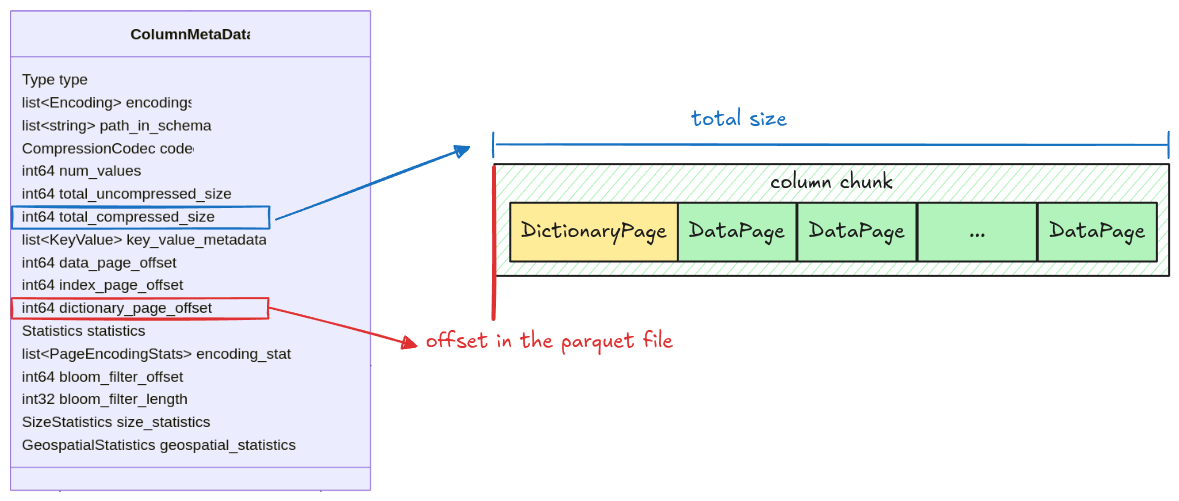
The dictionary page, if exists, will be placed at the first page in a column chunk. Its position is
stored in the dictionary_page_offset field in the column metadata.
Dictionary Page Layout
Unlike Data Page Layout, the dictionary page layout is very simple, just a header with encoded values.
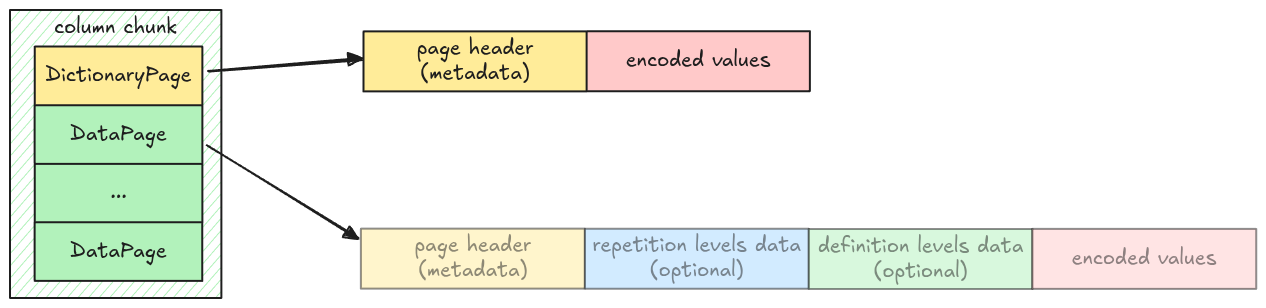
This is represented in code as an enum variant Page::DictionaryPage in src/page.rs.
pub enum Page {
    // ...
    DictionaryPage {
        page_header: PageHeader,
        encoded_values: Bytes,
    },
}
A column might or might not contain a dictionary page, which is represented as an optional field
dictionary_page in Pages:
pub struct Pages {
    pub data_pages: Vec<Page>,
    pub dictionary_page: Option<Page>,
}
Dictionary Page Decoder
The dictionary page can be decoded using Plain decoder. The decoded result is a vector of entries, which data pages can refer to using value’s indexes.
Task
read_page
Update the read_page function in src/page.rs, make it work with Page::DictionaryPage.
pub fn read_page(data: Bytes, codec: CompressionCodec) -> Result<(Page, Bytes)> {
    // ...
}
read_pages
Update the read_pages function in src/page.rs, make it work when there is a dictionary page. You
might find the Page::is_dictionary() helper function useful.
pub fn read_pages(data: Bytes, column_metadata: &ColumnMetaData) -> Result<Pages> {
    // ...
}
dictionary_entries
Implement the dictionary_entries function in src/dictionary.rs. It takes a Pages and returns a
decoded dictionary entries as a vector of Scalar if exists.
pub fn dictionary_entries(pages: &Pages, parquet_type: Type) -> Result<Option<Vec<Scalar>>> {
    todo!("step12-01: extract dictionary entries from dictionary page")
}
Test
Test case for this step is step12_01_dictionary_page.
Hints and Solution
Hint (how to get the correct page offset)
Use dictionary_page_offset, if it is None, take data_page_offset instead.
let offset = column_metadata
    .dictionary_page_offset
    .unwrap_or(column_metadata.data_page_offset) as usize;
Solution
read_page:
pub fn read_page(data: Bytes, codec: CompressionCodec) -> Result<(Page, Bytes)> {
    // ...
    let page = match page_header.type_ {
        // ...
        PageType::DICTIONARY_PAGE => Page::DictionaryPage {
            page_header,
            encoded_values: page_data,
        },
      // ...
}read_pages:
pub fn read_pages(data: Bytes, column_metadata: &ColumnMetaData) -> Result<Pages> {
    let offset = column_metadata
        .dictionary_page_offset
        .unwrap_or(column_metadata.data_page_offset) as usize;
    let len = column_metadata.total_compressed_size as usize;

    let mut pages_bytes = data.slice(offset..offset + len);
    let mut data_pages = vec![];
    let mut dictionary_page = None;

    while !pages_bytes.is_empty() {
        let (page, remaining) = read_page(pages_bytes, column_metadata.codec)?;
        if page.is_dictionary() {
            dictionary_page = Some(page);
        } else {
            data_pages.push(page);
        }
        pages_bytes = remaining;
    }

    Ok(Pages {
        data_pages,
        dictionary_page,
    })
}dictionary_entries:
pub fn dictionary_entries(pages: &Pages, parquet_type: Type) -> Result<Option<Vec<Scalar>>> {
    let dictionary_entries = match &pages.dictionary_page {
        Some(page) => {
            let dictionary_entries = decode_page(page, parquet_type, page.num_values())?;
            Some(dictionary_entries)
        }
        None => None,
    };
    Ok(dictionary_entries)
}