Data Page
A parquet file can have multiple page types, including dictionary page, data page, index page; each serves different purposes. In this step, we handle the data page, which stores the actual column data.
General Page Layout
A page has two parts:
- Page header: metadata containing the number of values in a page, the page size, the compression codec, etc
- Compressed Page Data: the actual values for a page; in case of data page, it is the column data.
The size of the compressed page data is stored in the
compressed_page_sizefield in the header
If the page is uncompressed, we still refer to it as a compressed page where the compressed data is exactly the raw data. For now, all pages are uncompressed, page decompression will be handled later in the Compression section.
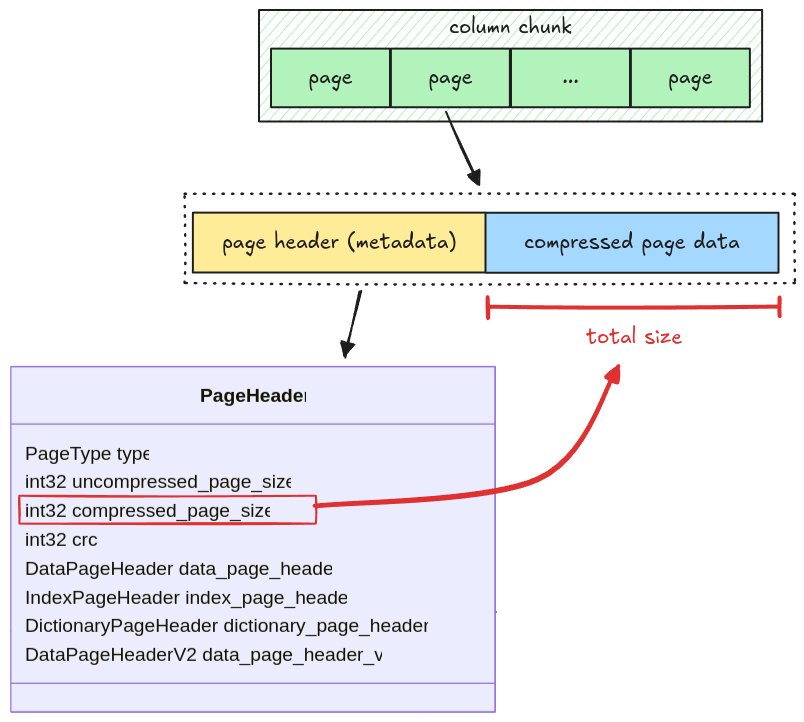
There are two types of data page: Version 1 and Version 2. To make the implementation simple, we only deal with data page Version 1.
Data Page Layout
A data page contains 3 pieces of information:
- repetition levels data: the nested level of the current column, which is used to parse nested data types (i.e. arrays)
- definition levels data: the null map for columns having null data, which will be explained in Definition Levels Decoder
- encoded values: the actual column data
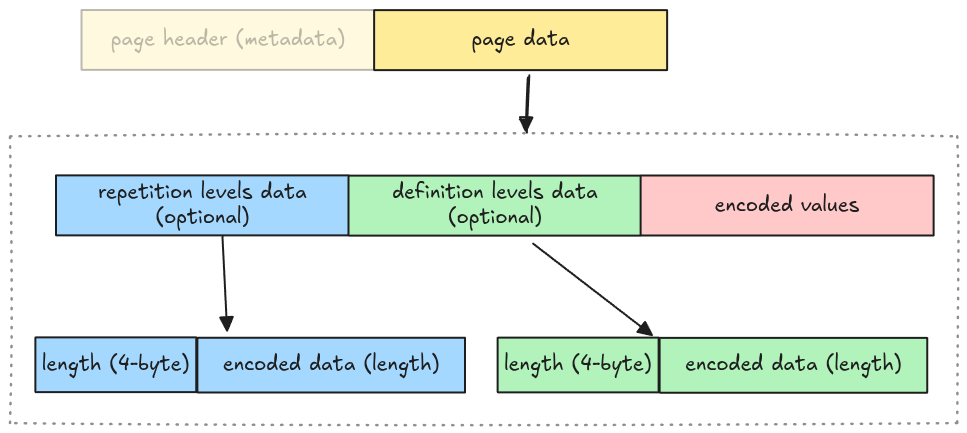
Whether repetition levels data and definition levels data are included is determined by walking the file schema. To make the implementation simple, we omit this step and make some assumptions:
- No nested data types support: the repetition levels data is excluded
- All columns might contain nulls: the definition levels data is included
Which means the actual data page layout for our parser is:
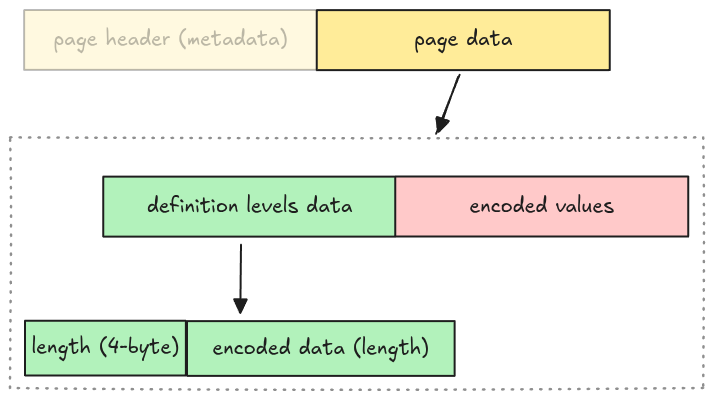
We represent this as an enum variant Page::DataPage in src/page.rs with 3 required fields
mentioned above.
pub enum Page {
    DataPage {
        page_header: PageHeader,
        definition_levels: Bytes,
        encoded_values: Bytes,
    },
    // ...
Task
Implement the read_page function in src/page.rs. It takes an entire page data as Bytes and
returns a Page struct with the remaining bytes.
pub fn read_page(data: Bytes, codec: CompressionCodec) -> Result<(Page, Bytes)> {
    todo!("step03: read a single page data")
}
The codec argument is for handling page decompression in the
Compression section, you should ignore it for now.
Test
Test case for this step is step03_data_page.
Hints and Solution
Hint (steps to read a page)
- read the page header
- read definition levels
- read encoded values
Hint (how to read page header)
The page header is metadata, you can use read_thrift_metadata::<PageHeader>.
Hint (how to parse definition levels data)
The definition levels contains 4-byte length, then its actual data. You can get the length first, then the data. The tricky part is that the definition levels data needs to contain the length itself.
// clone the data so that we don't advance the cursor
let length = data.clone().get_u32_le() as usize;
// get the data and its length
let definition_levels = data.slice(..length + 4);
Solution
pub fn read_page(data: Bytes, codec: CompressionCodec) -> Result<(Page, Bytes)> {
    let (page_header, mut remaining) = read_thrift_metadata::<PageHeader>(data)?;
    let mut page_data = remaining.split_to(page_header.compressed_page_size as usize);

    let page = match page_header.type_ {
        PageType::DATA_PAGE => {
            // because the definition levels contains the length itself,
            // we need to clone the data to avoid shifting its bytes.
            let definition_levels_len = page_data.clone().get_u32_le() as usize;
            let definition_levels = page_data.split_to(definition_levels_len + 4);

            Page::DataPage {
                page_header,
                definition_levels,
                encoded_values: page_data,
            }
        }
        PageType::DICTIONARY_PAGE => {
            todo!("read_page: handle read dictionary page in `step11: dictionary page` section")
        }
        page_type => unimplemented!("read_page: unsupported {:?}", page_type),
    };

    Ok((page, remaining))
}