Introduction
This book is part of my parquet learning journey. It shows you how to implement a parquet parser from scratch. The goal of this book is to understand the internals of the parquet file format by actually writing a parser. It does not, however, cover how to to use parquet, or how to query it efficiently.
The book itself is written as a series of exercises; each step contains test cases to verify the implementation. At the end, the parser will be able to read parquet files with primitive types, basic encodings, compression, and nulls.
The parser is written in Rust and readers are expected to implement all the steps themselves to have a working parser.
Prerequisites
How to start
To start, clone this repository, and checkout the
starter branch.
git clone https://github.com/dqkqd/parquet-parser.git

cd parquet-parser

git checkout starter
How to test
Each step has several test cases in tests/integration/mod.rs, all of them are disabled by default.
You should uncomment the correct tests when implementing a specific step.
// mod step01_magic;
// mod step02_file_metadata;
// mod step03_data_page;
// mod step04_data_pages;
// mod step05_plain_decoder;
// mod step06_column;
// mod step07_row_group;
// mod step08_parquet_file;
// mod step09_boolean_column;
// ...
Tips
- The codebase relies heavily on external crates such as bytes; consider checking their docs when implementing.
- Having a look at the corresponding tests before implementation is always a good idea to understand what they actually test for.
Overview
This section describes a high-level overview of parquet and what we will do (roughly) to parse it.
Parquet File Format
Parquet is a columnar file format; unlike traditional row-based formats, parquet stores column data close together.
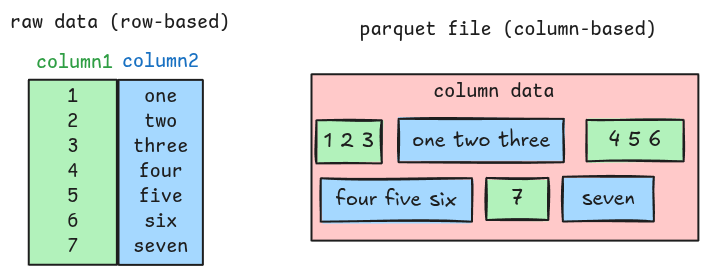
Along with the actual column data, a parquet file also contains metadata such as column position, column type, encoding, etc. These provide enough information to the parser for extracting all the column data. This means the parser must understand both the metadata and the column data to completely parse a parquet file.
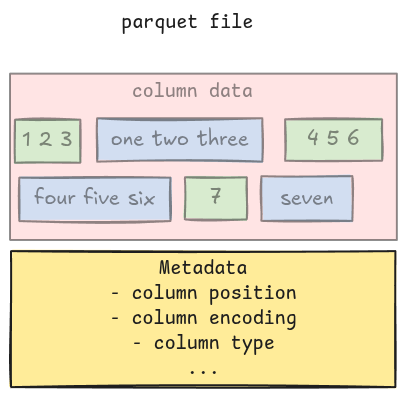
Metadata
In parquet, metadata includes file metadata, column metadata, row group metadata, column chunk metadata, etc. There are many of them, and writing a parser to parse them is a daunting task. Luckily, the spec comes with a full Thrift definition for all the metadata, which can be used to generate all parsing code.
The starter code includes a ready-to-use function for this: read_thrift_metadata, which takes a
Bytes, and returns a corresponding metadata with the remaining bytes, based on the template
argument.
let (metadata, remaining) = read_thrift_metadata::<MetaData>(data);Column data
The main focus in the book will be parsing column data. The flow can be simplified like this:
- Read the metadata
- Parse the column data
- Merge all the column data together
Implementation
The book has several sections building on top of each other. Below is a rough guideline:
- Parse the file metadata
- Parse a single column with Plain Encoding
- Parse many columns
- Parse a complete file
- Parse files with RLE Bit-packing Hybrid Encoding
- Parse files with null values
- Parse files with Dictionary Encoding
- Parse files with compression
Magic Number
The magic number tells the parser whether it is reading a parquet file. This is a 4-byte PAR1 and
is located at the beginning and at the end of a file.

Task
Implement the ensure_header_footer_magic function in src/magic.rs. It takes the entire file data
as Bytes and returns an error if this is not a parquet file.
pub fn ensure_header_footer_magic(data: Bytes) -> Result<()> {
    todo!("step01: implement magic number")
}
Test
To verify the implementation, uncomment the test in tests/integration/mod.rs.
-// mod step01_magic;
+mod step01_magic;
And run:
cargo test
Hints and Solution
Hint
You can use starts_with and ends_with functions to check whether the magic number is correctly
present at both ends of the file.
Solution
pub fn ensure_header_footer_magic(data: Bytes) -> Result<()> {
    if data.len() < 8 || !data.starts_with(b"PAR1") || !data.ends_with(b"PAR1") {
        bail!("Magic: not a parquet file")
    }
    Ok(())
}
File Metadata
The parser needs to read some metadata before parsing column data. The first one is the file metadata, located at the end of the file, right before the footer magic number.

Task
Implement the read_file_metadata function in src/file_metadata.rs. It takes the entire file data
as Bytes and returns a FileMetaData struct.
pub fn read_file_metadata(data: Bytes) -> Result<FileMetaData> {
    todo!("step02: read file metadata.")
}
To parse it, you should read the 4-byte file metadata length first, then the raw file metadata, and
use the read_thrift_metadata introduced in the Overview to convert it to
FileMetaData.
Test
The corresponding test is step02_file_metadata.
-// mod step02_file_metadata;
+mod step02_file_metadata;
Hints and Solution
Hint (how to get raw file metadata in bytes)
The 4-byte file metadata length can be parsed using
Bytes::get_u32_le.
Remember it is right before the footer magic number.
let metadata_size = data.slice(data.len() - 8..).get_u32_le();Then the raw file metadata in bytes can be extracted like this.
let metadata_bytes = data.slice(data.len() - 8 - metadata_size..data.len() - 8);Hint (how to parse file metadata)
The FileMetaData can be parsed using read_thrift_metadata.
let (metadata, _) = read_thrift_metadata::<FileMetaData>(metadata_bytes)?;Solution
pub fn read_file_metadata(data: Bytes) -> Result<FileMetaData> {
    let metadata_size = data.slice(data.len() - 8..).get_u32_le() as usize;
    let metadata_bytes = data.slice(data.len() - 8 - metadata_size..data.len() - 8);
    let (metadata, _) = read_thrift_metadata::<FileMetaData>(metadata_bytes)?;
    Ok(metadata)
}
Understand File Format
Before implementing further, let’s look at the parquet file format and its file metadata.
A parquet file has multiple row groups; each row group has multiple columns; each column has multiple pages, which contain the actual column data.
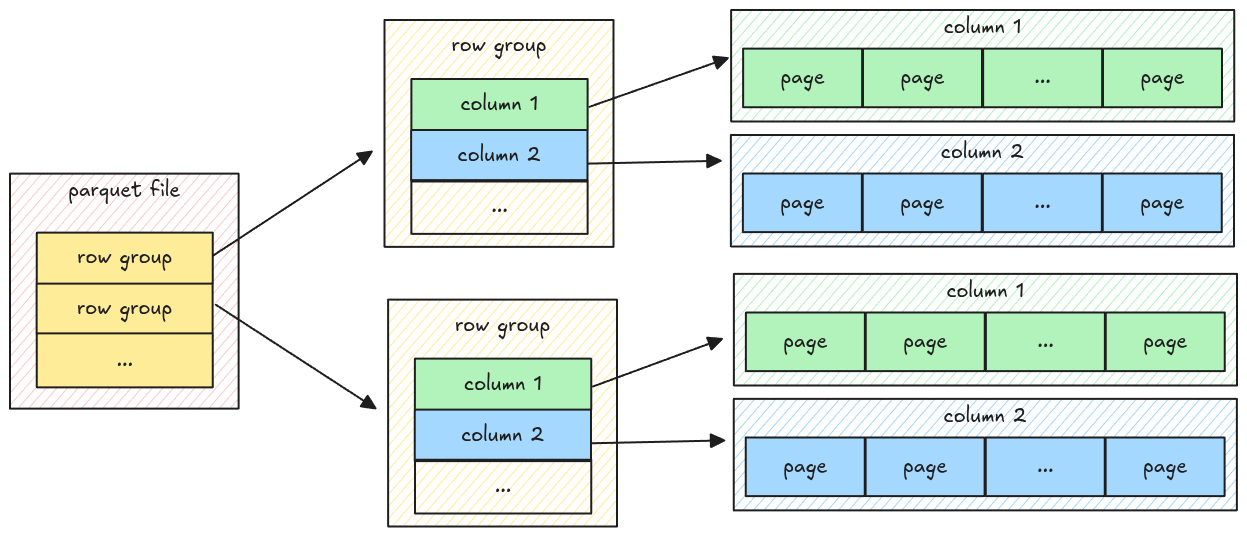
The data only exists at the page level, which means to parse all the data, the parser must go down to the page level, get the data, and merge it back.
Data Page
A parquet file can have multiple page types, including dictionary page, data page, index page; each serves different purposes. In this step, we handle the data page, which stores the actual column data.
General Page Layout
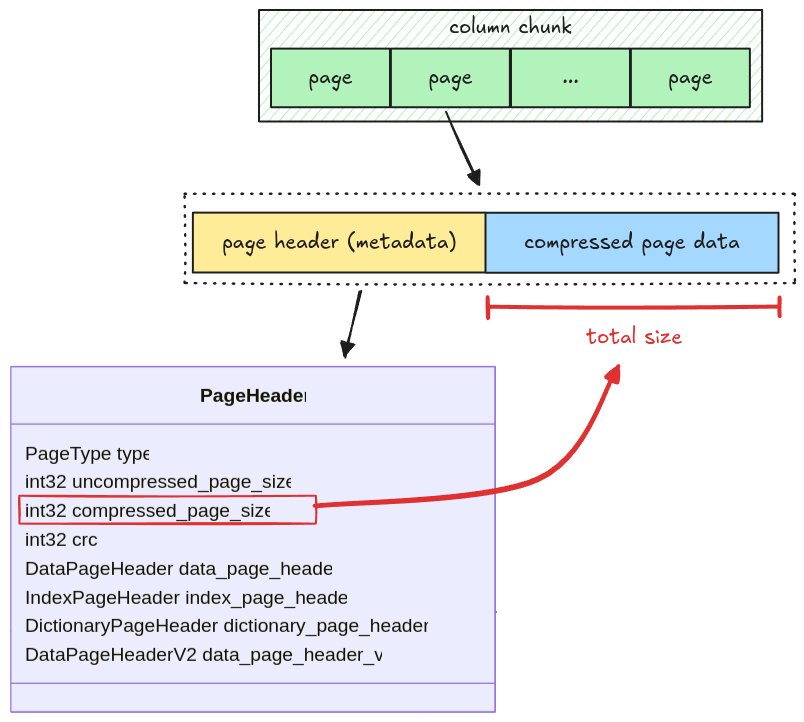
A page has two parts:
- Page header: metadata containing the number of values in a page, the page size, the compression codec, etc
- Compressed Page Data: the actual values for a page; in case of data page, it is the column data.
The size of the compressed page data is stored in the
compressed_page_sizefield in the header
If the page is uncompressed, we still refer to it as a compressed page where the compressed data is exactly the raw data. For now, all pages are uncompressed, page decompression will be handled later in the Compression section.
There are two types of data page: Version 1 and Version 2. To make the implementation simple, we only deal with data page Version 1.
Data Page Layout
A data page contains 3 pieces of information:
- repetition levels data: the nested level of the current column, which is used to parse nested data types (i.e. arrays)
- definition levels data: the null map for columns having null data, which will be explained in Definition Levels Decoder
- encoded values: the actual column data
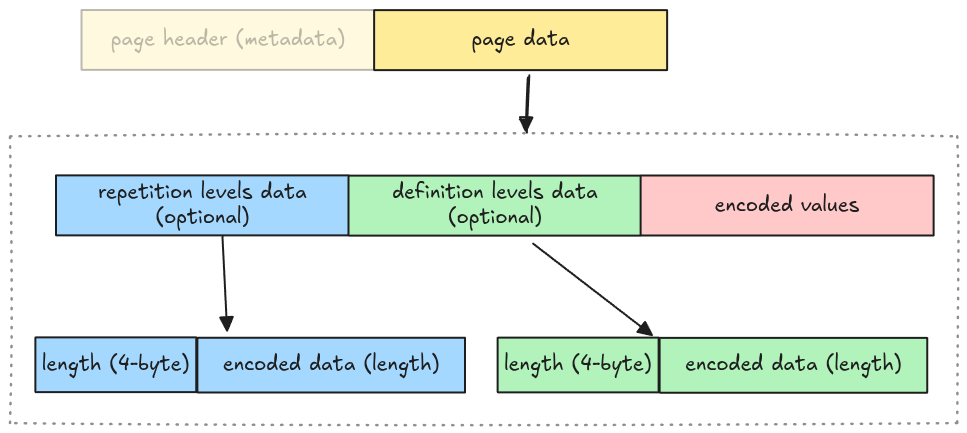
Whether repetition levels data and definition levels data are included is determined by walking the file schema. To make the implementation simple, we omit this step and make some assumptions:
- No nested data types support: the repetition levels data is excluded
- All columns might contain nulls: the definition levels data is included
Which means the actual data page layout for our parser is:
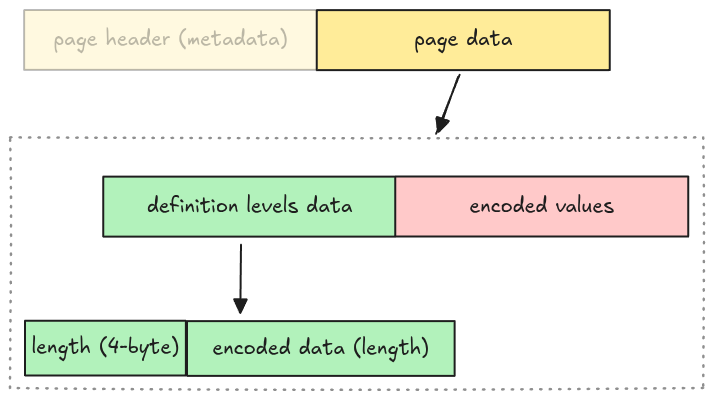
We represent this as an enum variant Page::DataPage in src/page.rs with 3 required fields
mentioned above.
pub enum Page {
    DataPage {
        page_header: PageHeader,
        definition_levels: Bytes,
        encoded_values: Bytes,
    },
    // ...
Task
Implement the read_page function in src/page.rs. It takes an entire page data as Bytes and
returns a Page struct with the remaining bytes.
pub fn read_page(data: Bytes, codec: CompressionCodec) -> Result<(Page, Bytes)> {
    todo!("step03: read a single page data")
}
The codec argument is for handling page decompression in the
Compression section, you should ignore it for now.
Test
Test case for this step is step03_data_page.
Hints and Solution
Hint (steps to read a page)
- read the page header
- read definition levels
- read encoded values
Hint (how to read page header)
The page header is metadata, you can use read_thrift_metadata::<PageHeader>.
Hint (how to parse definition levels data)
The definition levels contains 4-byte length, then its actual data. You can get the length first, then the data. The tricky part is that the definition levels data needs to contain the length itself.
// clone the data so that we don't advance the cursor
let length = data.clone().get_u32_le() as usize;
// get the data and its length
let definition_levels = data.slice(..length + 4);
Solution
pub fn read_page(data: Bytes, codec: CompressionCodec) -> Result<(Page, Bytes)> {
    let (page_header, mut remaining) = read_thrift_metadata::<PageHeader>(data)?;
    let mut page_data = remaining.split_to(page_header.compressed_page_size as usize);

    let page = match page_header.type_ {
        PageType::DATA_PAGE => {
            // because the definition levels contains the length itself,
            // we need to clone the data to avoid shifting its bytes.
            let definition_levels_len = page_data.clone().get_u32_le() as usize;
            let definition_levels = page_data.split_to(definition_levels_len + 4);

            Page::DataPage {
                page_header,
                definition_levels,
                encoded_values: page_data,
            }
        }
        PageType::DICTIONARY_PAGE => {
            todo!("read_page: handle read dictionary page in `step11: dictionary page` section")
        }
        page_type => unimplemented!("read_page: unsupported {:?}", page_type),
    };

    Ok((page, remaining))
}
Data Pages
As noted in the Understand File Format, a column has multiple pages, all packed together. In this step, we will extract all pages for a given column chunk.
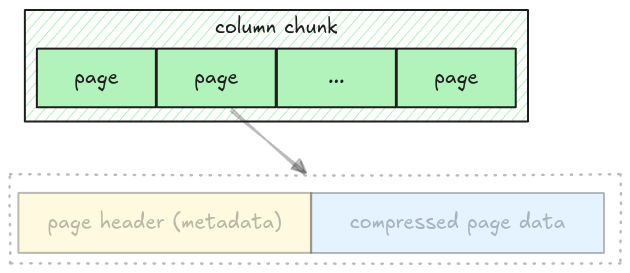
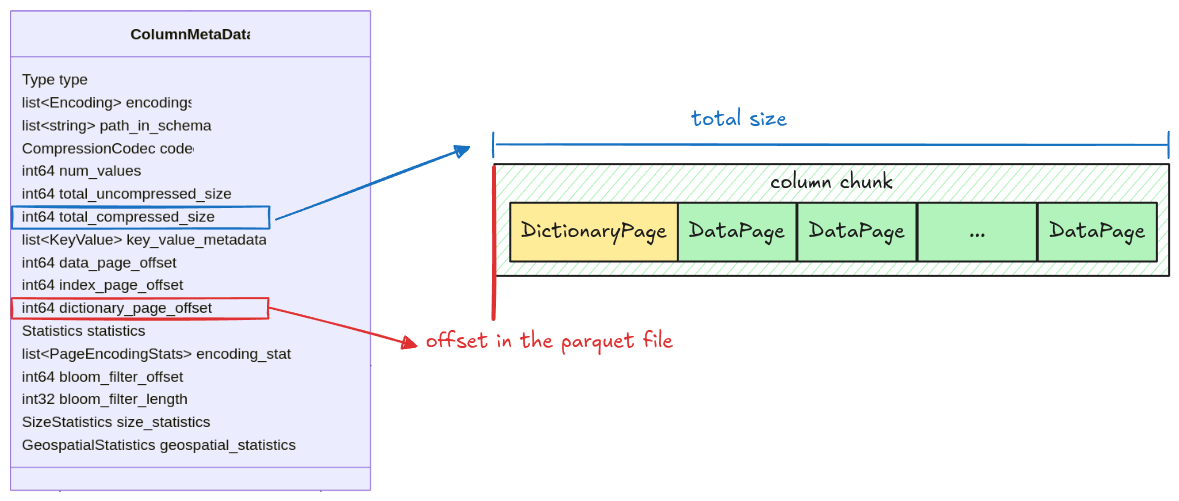
All information for getting a column chunk data is stored in the ColumnMetaData, which contains:
data_page_offset: the offset of a column chunk in a parquet filetotal_compressed_size: the length of a column chunk data, this includes multiple pages packed together
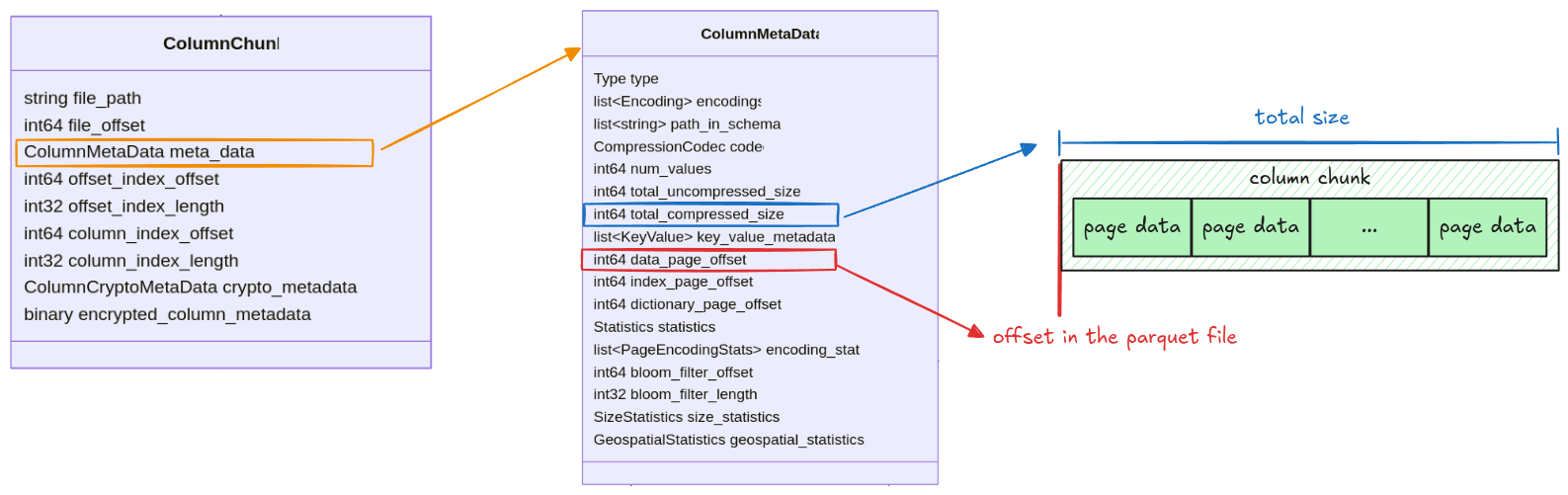
Pages in a column chunk are represented as Pages struct with 2 fields: data_pages and
dictionary_page. For this step, we only focus on the data_pages, the dictionary_page will be
handled later in the Dictionary Page section.
pub struct Pages {
    pub data_pages: Vec<Page>,
    pub dictionary_page: Option<Page>,
}
Task
Implement the read_pages function in src/page.rs. It takes the entire file data as Bytes and
returns a Pages struct.
pub fn read_pages(data: Bytes, column_metadata: &ColumnMetaData) -> Result<Pages> {
    todo!("step04: read all pages for a given column chunk")
}
You should use the read_page function from the previous step and keep
extracting pages until there are none left.
Test
Test case for this step is step04_data_pages.
Hints and Solution
Hint (how to get the raw column chunk bytes)
The column chunk’s position and its length are stored in data_page_offset and
total_compressed_size. The raw bytes can be extracted like this:
let column_chunk_data = data.slice(data_page_offset..data_page_offset + total_compressed_size)Hint (how to extract all pages)
The read_page function returns the remaining bytes. Keep applying read_page until there are no
bytes left.
while !data.is_empty() {
    let (page, remaining) = read_page(/* ... */);
    data = remaining;
}
Solution
pub fn read_pages(data: Bytes, column_metadata: &ColumnMetaData) -> Result<Pages> {
    let offset = column_metadata.data_page_offset as usize;
    let len = column_metadata.total_compressed_size as usize;

    let mut pages_bytes = data.slice(offset..offset + len);
    let mut data_pages = vec![];

    while !pages_bytes.is_empty() {
        let (page, remaining) = read_page(pages_bytes, column_metadata.codec)?;
        data_pages.push(page);
        pages_bytes = remaining;
    }

    Ok(Pages {
        data_pages,
        dictionary_page: None,
    })
}
Plain Decoder
We now have all pages for a single column chunk. However, all of them are encoded. In this step, we will decode page data and extract the actual column values. Let’s start with the simplest one: Plain encoding.
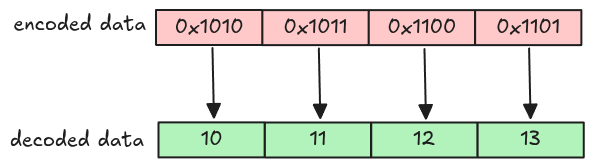
Plain Encoding
In plain encoding, each value is encoded separately depending on the column data type. For our parser, only these data types are supported (the explanations are taken from the spec).
| Data type | Parquet type | Explanation |
|---|---|---|
| BOOLEAN | BOOLEAN | Bit packed, LSB first |
| INT32 | INT32 | 4 bytes little endian |
| INT64 | INT64 | 8 bytes little endian |
| FLOAT | FLOAT | 4 bytes IEEE little endian |
| DOUBLE | DOUBLE | 8 bytes IEEE little endian |
| STRING | BYTE_ARRAY | length in 4 bytes little endian followed by the bytes contained in the array |
To represent a decoded value in code, we use
Polars Scalar. This makes the
implementation much simpler as we don’t have to deal with type erasure, type casting, etc. A
Scalar can be created like this.
let scalar_integer = Scalar::from(1i32);
let scalar_string = Scalar::from(PlSmallStr::from_string("one"))
Task
plain_decode
Implement the plain_decode function in src/decoder/plain.rs. It takes the encoded page data as
Bytes and returns a decoded vector of Scalar based on the data type. The num_values is the
expected value for the vector.
pub fn plain_decode(
    encoded_data: Bytes,
    parquet_type: Type,
    num_values: usize,
) -> Result<Vec<Scalar>> {
    match parquet_type {
        Type::INT32 => todo!("step05: decode int32"),
        Type::INT64 => todo!("step05: decode int64"),
        Type::FLOAT => todo!("step05: decode float"),
        Type::DOUBLE => todo!("step05: decode double"),
        Type::BYTE_ARRAY => todo!("step05: decode string"),
        Type::BOOLEAN => todo!("step09: decode boolean"),
        _ => unimplemented!("plain_decode: unsupported data type {:?}", parquet_type),
    }
}
Some important notes:
-
You don’t have to handle
BOOLEANdata yet, it requires different encoding, which will be covered in Boolean Data section -
To avoid messing with unicode data, we assume all
BYTE_ARRAYdata can be converted toStringwithout error. In other words, this never panicsString::from_utf8(data).unwrap()
decode_page
Implement the decode_page function insrc/decoder/mod.rs. This is a wrapper around all supported
decoders, it checks the page’s encoding and applies the correct decoder. You need to handle the
Encoding::PLAIN arm in this step.
pub fn decode_page(page: &Page, parquet_type: Type, num_values: usize) -> Result<Vec<Scalar>> {
    match page.encoding() {
        Encoding::PLAIN => todo!("step05: plain decoder"),
        // ...
    }
}
You can get the encoded page data using Page::encoded_values().
Test
Test case for this step is step05_plain_decoder.
Hints and Solution
Hint (how to decode non-string types)
Some functions from the bytes crate docs are useful
to extract primitive types. The extracted value can be converted to Scalar using Scalar::from.
For example, this decodes the INT32 data.
let scalar = Scalar::from(data.get_i32_le());Hint (how to decode string type)
String uses a variable length, the first 4 bytes is the length followed by the actual string value.
let length = data.get_u32_le() as usize;
let string = data.slice(..length)
The actual bytes value can then be converted to String using String::from_utf8 and
PlSmallStr::from_string.
let string = String::from_utf8(data).unwrap();
Scalar::from(PlSmallStr::from_string(string))
Solution
plain_decode:
pub fn plain_decode(
    encoded_data: Bytes,
    parquet_type: Type,
    num_values: usize,
) -> Result<Vec<Scalar>> {
    let mut encoded_data = encoded_data;
    let mut scalars = Vec::with_capacity(num_values);

    match parquet_type {
        Type::INT32 => {
            for _ in 0..num_values {
                scalars.push(Scalar::from(encoded_data.get_i32_le()))
            }
        }
        Type::INT64 => {
            for _ in 0..num_values {
                scalars.push(Scalar::from(encoded_data.get_i64_le()))
            }
        }
        Type::FLOAT => {
            for _ in 0..num_values {
                scalars.push(Scalar::from(encoded_data.get_f32_le()))
            }
        }
        Type::DOUBLE => {
            for _ in 0..num_values {
                scalars.push(Scalar::from(encoded_data.get_f64_le()))
            }
        }
        Type::BYTE_ARRAY => {
            for _ in 0..num_values {
                let size = encoded_data.get_u32_le() as usize;
                let string = String::from_utf8(encoded_data.split_to(size).to_vec())?;
                scalars.push(Scalar::from(PlSmallStr::from_string(string)))
            }
        }
        Type::BOOLEAN => todo!("step09: decode boolean"),
        _ => unimplemented!("plain_decode: unsupported data type {:?}", parquet_type),
    }

    Ok(scalars)
}decode_page:
pub fn decode_page(page: &Page, parquet_type: Type, num_values: usize) -> Result<Vec<Scalar>> {
    match page.encoding() {
        Encoding::PLAIN => plain_decode(page.encoded_values(), parquet_type, num_values),
        // ...
    }
}
Column
We know how to get all pages for a column chunk and how to decode an individual page. Now, let’s put all of them together and completely parse a column chunk.
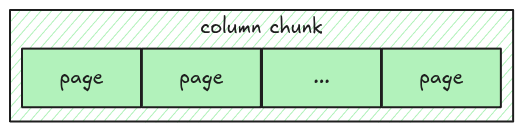
To represent a column, we use Polars Column.
Task
Implement the read_column function in src/column.rs. It takes the entire file data as Bytes
and returns a Column data for a given column chunk.
pub fn read_column(data: Bytes, column_chunk: &ColumnChunk) -> Result<Column> {
    todo!("step06: implement read column")
}
Some important notes:
- Everything you need to parse column data is stored in the column metadata
- To get the number of values in a page, you can use
Page::num_values() - To convert a vector of
ScalartoColumn, you might find the helpercolumn_from_scalarsuseful
Test
Test case for this step is step06_column.
Hints and Solution
Hint (how to get the column metadata)
The column metadata is stored as meta_data field in a ColumnChunk.
column_chunk
    .meta_data
    .as_ref()
    .expect("read_column: missing column metadata");
Hint (how to get the parquet data type)
The parquet data type can be retrieved from column_metadata.type_.
Solution
pub fn read_column(data: Bytes, column_chunk: &ColumnChunk) -> Result<Column> {
    let column_metadata = column_chunk
        .meta_data
        .as_ref()
        .expect("read_column: missing column metadata");
    let pages = read_pages(data, column_metadata)?;
    let mut scalars = Vec::with_capacity(column_metadata.num_values as usize);
    for page in pages.data_pages {
        let decoded_scalars = decode_page(&page, column_metadata.type_, page.num_values())?;
        scalars.extend(decoded_scalars);
    }
    column_from_scalars(scalars, column_metadata)
}
Row Group
From the Understand File Format section, we know a parquet file has multiple row groups, each row group has multiple column chunks. In this step, we will read all of them!
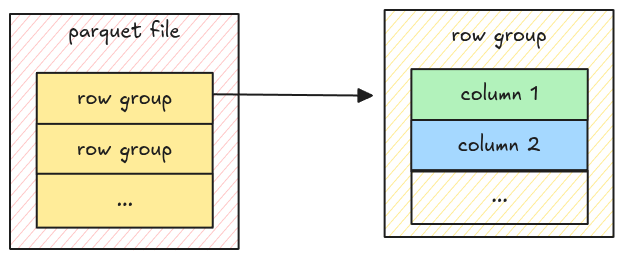
The relationship above looks like this from the metadata spec.
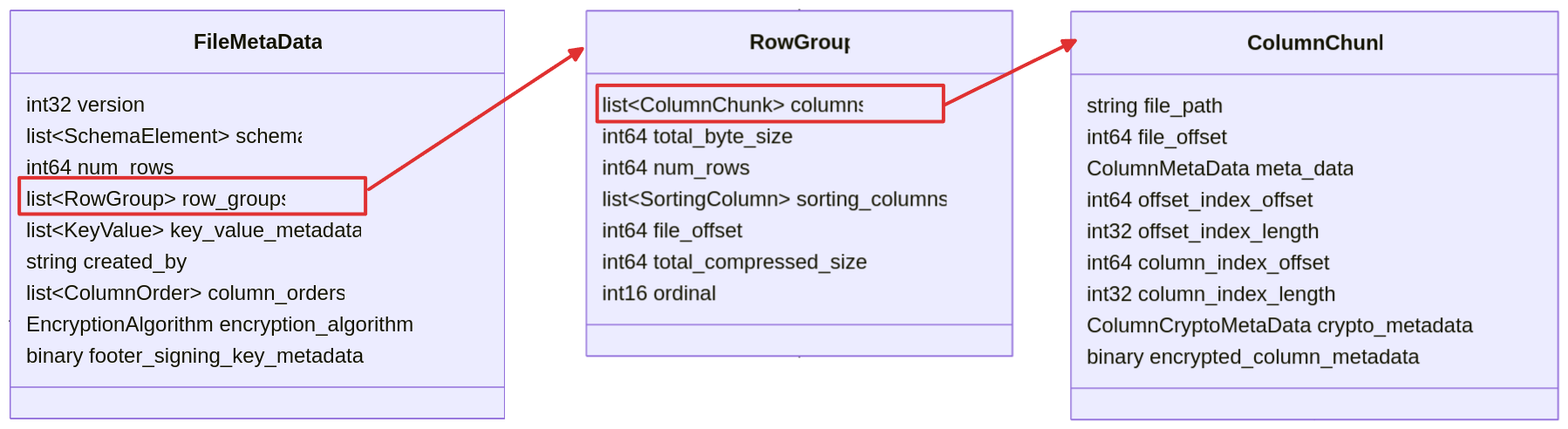
As some of you might expect, to represent the data for a row group and a parquet file, we use Polars DataFrame.
Task
read_row_group
Implement the read_row_group function in scr/row_group.rs. It takes the entire file data as
Bytes and returns a DataFrame.
pub fn read_row_group(data: Bytes, row_group: &RowGroup) -> Result<DataFrame> {
    todo!("step07: implement read row group")
}
You can use
DataFrame::new_infer_height
to group multiple columns together into a single DataFrame.
read_row_groups
Implement the read_row_groups function in src/row_group.rs. It takes the entire file data as
Bytes and returns a DataFrame.
pub fn read_row_groups(data: Bytes, file_metadata: &FileMetaData) -> Result<DataFrame> {
    todo!("step07: implement read row groups")
}
You can use concat to concatenate the
DataFrame from all groups into a single DataFrame.
Test
Test case for this step is step07_row_group.
Hints and Solution
Hint (How to concatenate multiple data frames)
Convert the DataFrame into a LazyFrame, then use the
concat function.
// convert `DataFrame` into `LazyFrame`
let lazyframes: Vec<LazyFrame> = dataframes.into_iter().map(|df| df.lazy()).collect();

// concatenate `LazyFrame` to a single `DataFrame`
concat(
    lazyframes,
    UnionArgs {
        strict: true,
        ..Default::default()
    },
)?
.collect()?;
Solution
read_row_group:
pub fn read_row_group(data: Bytes, row_group: &RowGroup) -> Result<DataFrame> {
    let mut columns = Vec::with_capacity(row_group.columns.len());
    for column_chunk in &row_group.columns {
        let column = read_column(data.clone(), column_chunk)?;
        columns.push(column);
    }
    let df = DataFrame::new_infer_height(columns)?;
    Ok(df)
}read_row_groups:
pub fn read_row_groups(data: Bytes, file_metadata: &FileMetaData) -> Result<DataFrame> {
    let mut dfs = Vec::with_capacity(file_metadata.row_groups.len());
    for row_group in &file_metadata.row_groups {
        let df = read_row_group(data.clone(), row_group)?;
        dfs.push(df.lazy());
    }
    let df = concat(
        dfs,
        UnionArgs {
            strict: true,
            ..Default::default()
        },
    )?
    .collect()?;
    Ok(df)
}
Parquet File
Let’s put everything together and read a complete parquet file.
Task
Implement the read_parquet function in src/reader.rs.
pub fn read_parquet(file_path: impl AsRef<Path>) -> Result<DataFrame> {
    todo!("step08: implement read parquet")
}
Test
Test case for this step is step08_parquet_file.
Hints and Solution
Hint (steps to parse a parquet file)
- Read the file into
Vec<u8>and convert it toBytes - Verify the magic number
- Read the file metadata
- Read the row groups
Solution
pub fn read_parquet(file_path: impl AsRef<Path>) -> Result<DataFrame> {
    let mut file = File::open(file_path)?;
    let mut buf = Vec::new();
    file.read_to_end(&mut buf)?;

    let data = Bytes::from(buf);
    ensure_header_footer_magic(data.clone())?;
    let file_metadata = read_file_metadata(data.clone())?;
    let df = read_row_groups(data, &file_metadata)?;
    Ok(df)
}
Bonus: Interactive Testing
This section introduces an interactive way to test the parser using the CLI.
CLI
The starter code comes with a CLI that has several useful commands:
Usage: parquet-parser <COMMAND>

Commands:
  read      Read parquet file
  write     Write a csv file to a parquet file
  metadata  Print the metadata for a parquet file
  verify    Verify the current parser output with the official parquet parser
  help      Print this message or the help of the given subcommand(s)

Options:
  -h, --help  Print help
At the moment, the parser can only read parquet files with plain encoding, no compression, etc.;
such files are rare in the wild. The write command is a convenient way to convert CSV into parquet
(the default arguments creates a plain encoding with no compression parquet file).
Write a csv file to a parquet file

Usage: parquet-parser write [OPTIONS] <CSV> <PARQUET>

Arguments:
  <CSV>      The input csv file
  <PARQUET>  The output parquet file

Options:
      --author <AUTHOR>
          The author [default: "Hello parquet!"]
      --dictionary
          Whether to enable dictionary encoding
      --encodings <ENCODINGS>
          Encoding for each column. Syntax: `--encodings <column_name>=<encoding>`. Supported encodings: [rle]
      --compression <COMPRESSION>
          Compression for the output parquet [default: uncompressed] [possible values: uncompressed, snappy]
      --rows-per-page <ROWS_PER_PAGE>
          The number of row per page in a column chunk
      --rows-per-group <ROWS_PER_GROUP>
          The number of row per groups in a row group
      --dtypes <DTYPES>
          Data type for each column. Syntax: `--dtypes <column_name>=<data_type>`. Supported data types: [boolean, int32, int64, float, double, string]
  -h, --help
          Print help
Try it out
Let’s convert this csv file to parquet, and read it using our parser.
# download csv file
curl -L -o public-cloud-provider-ip-ranges.csv https://raw.githubusercontent.com/tobilg/public-cloud-provider-ip-ranges/bda4bc1ac501f8bab9cd618b47eb336328e732cc/data/providers/all.csv

# convert to parquet
cargo run write public-cloud-provider-ip-ranges.csv public-cloud-provider-ip-ranges.parquet

# read it
cargo run read public-cloud-provider-ip-ranges.parquet
Result
This is the result:
    Finished `dev` profile [unoptimized + debuginfo] target(s) in 0.34s
     Running `target/debug/parquet-parser read public-cloud-provider-ip-ranges.parquet`
shape: (62_689, 6)
┌────────────────┬─────────────────┬──────────────┬─────────────────┬────────────────┬────────────────┐
│ cloud_provider ┆ cidr_block      ┆ ip_address   ┆ ip_address_mask ┆ ip_address_cnt ┆ region         │
│ ---            ┆ ---             ┆ ---          ┆ ---             ┆ ---            ┆ ---            │
│ str            ┆ str             ┆ str          ┆ i64             ┆ i64            ┆ str            │
╞════════════════╪═════════════════╪══════════════╪═════════════════╪════════════════╪════════════════╡
│ AWS            ┆ 1.178.1.0/24    ┆ 1.178.1.0    ┆ 24              ┆ 256            ┆ us-west-2      │
│ AWS            ┆ 1.178.10.0/24   ┆ 1.178.10.0   ┆ 24              ┆ 256            ┆ eu-central-1   │
│ AWS            ┆ 1.178.100.0/24  ┆ 1.178.100.0  ┆ 24              ┆ 256            ┆ us-west-1      │
│ AWS            ┆ 1.178.101.0/24  ┆ 1.178.101.0  ┆ 24              ┆ 256            ┆ ap-northeast-3 │
│ AWS            ┆ 1.178.102.0/24  ┆ 1.178.102.0  ┆ 24              ┆ 256            ┆ ap-southeast-5 │
│ …              ┆ …               ┆ …            ┆ …               ┆ …              ┆ …              │
│ Vultr          ┆ 95.179.208.0/20 ┆ 95.179.208.0 ┆ 20              ┆ 4096           ┆ FR-93          │
│ Vultr          ┆ 95.179.224.0/20 ┆ 95.179.224.0 ┆ 20              ┆ 4096           ┆ GB-LND         │
│ Vultr          ┆ 95.179.240.0/20 ┆ 95.179.240.0 ┆ 20              ┆ 4096           ┆ DE-HE          │
│ Vultr          ┆ 96.30.192.0/20  ┆ 96.30.192.0  ┆ 20              ┆ 4096           ┆ US-GA          │
│ Vultr          ┆ 96.30.208.0/20  ┆ 96.30.208.0  ┆ 20              ┆ 4096           ┆ US-FL          │
└────────────────┴─────────────────┴──────────────┴─────────────────┴────────────────┴────────────────┘
Metadata
You can also inspect the metadata using the metadata command:
cargo run metadata public-cloud-provider-ip-ranges.parquet
The output is quite verbose, but we can see that all of the columns are encoded using plain encoding
(you can ignore RLE as it is used for definition levels).
...
version: 1
num of rows: 62689
created by: Hello parquet!
...

column 0:
--------------------------------------------------------------------------------
column type: BYTE_ARRAY
column path: "cloud_provider"
encodings: PLAIN RLE
...

column 1:
--------------------------------------------------------------------------------
column type: BYTE_ARRAY
column path: "cidr_block"
encodings: PLAIN RLE
...

column 2:
--------------------------------------------------------------------------------
column type: BYTE_ARRAY
column path: "ip_address"
encodings: PLAIN RLE
...

column 3:
--------------------------------------------------------------------------------
column type: INT64
column path: "ip_address_mask"
encodings: PLAIN RLE
...

column 4:
--------------------------------------------------------------------------------
column type: INT64
column path: "ip_address_cnt"
encodings: PLAIN RLE
...

column 5:
--------------------------------------------------------------------------------
column type: BYTE_ARRAY
column path: "region"
encodings: PLAIN RLE
...
Boolean data
This section will handle the boolean data type. Recall from the Plain Decoder section, boolean data type is encoded using bit-packed encoding.
| Data type | Parquet type | Explanation |
|---|---|---|
| BOOLEAN | BOOLEAN | Bit packed, LSB first |
Bit-packed encoding
Bit-packed encoding encodes each value into bits (using the same bit-width), then packs them together (hence the name bit-packed). Below is an example of encoding 10, 20, 30, 40 using 6-bit width.
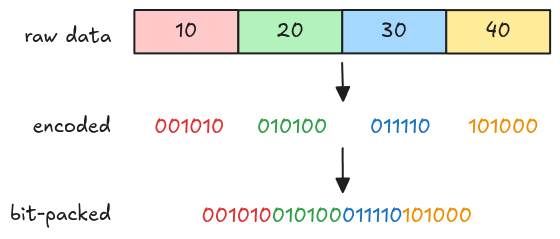
The figure above just gives you a rough idea of how bit-packed works in general, it isn’t exactly what parquet bit-packed encoding does, we will look into this later in Bit-packed arbitrary bit-width.
Parquet bit-packed encoding for boolean data
For boolean data, each value can be either true or false, so 1-bit width is sufficient. Encoding
and decoding using 1-bit width is much easier than arbitrary bit-width because there are no values
crossing byte boundaries.
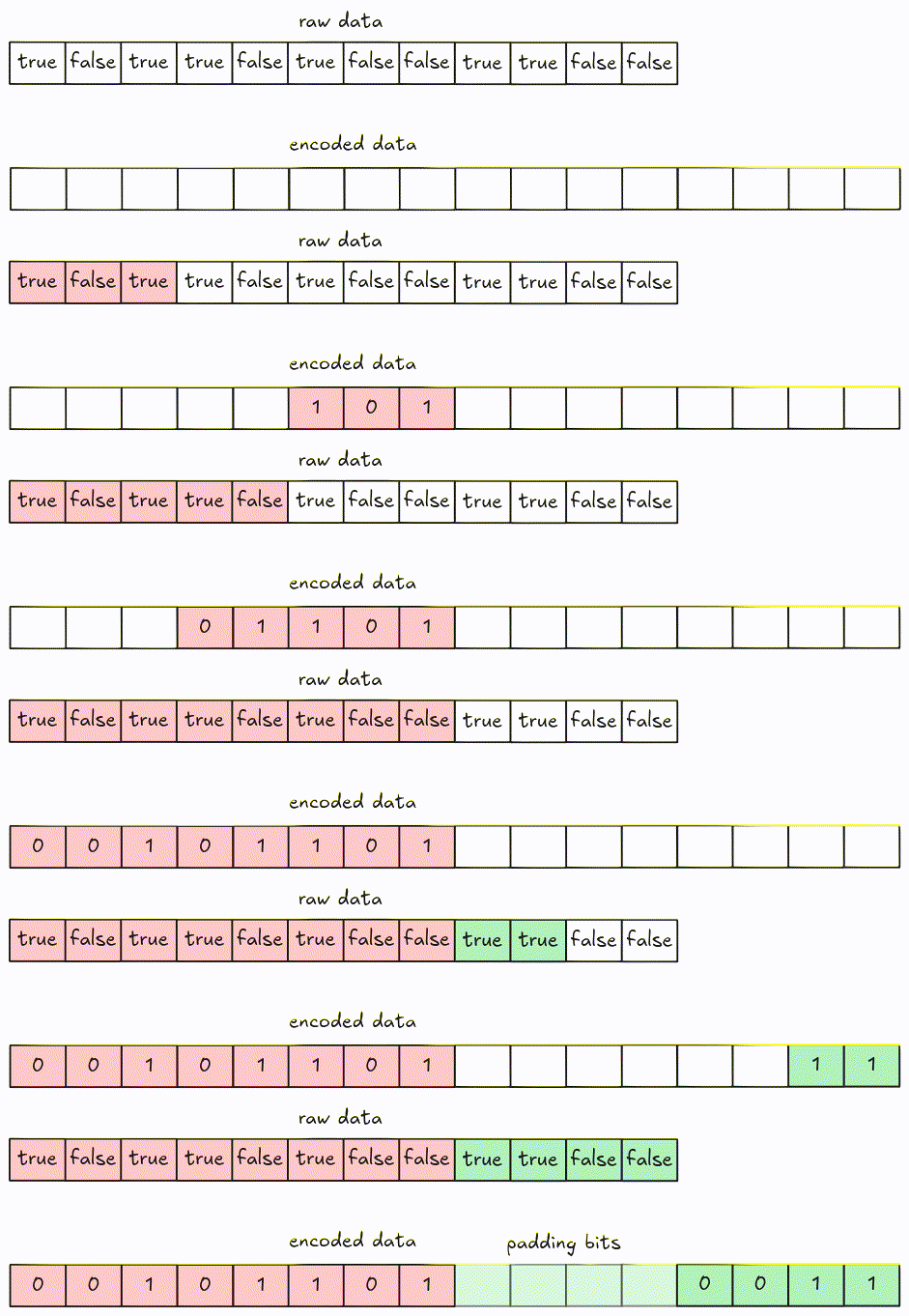
Encode
For encoding, values are packed together into 8-bit groups using LSB (Least Significant Bit) first. Groups with fewer than 8 bits are padded with 0.
Decode
Decoding can be performed by fetching every 8-bit group at a time, then shifting bits until there is no remaining data left (or if we get enough values).
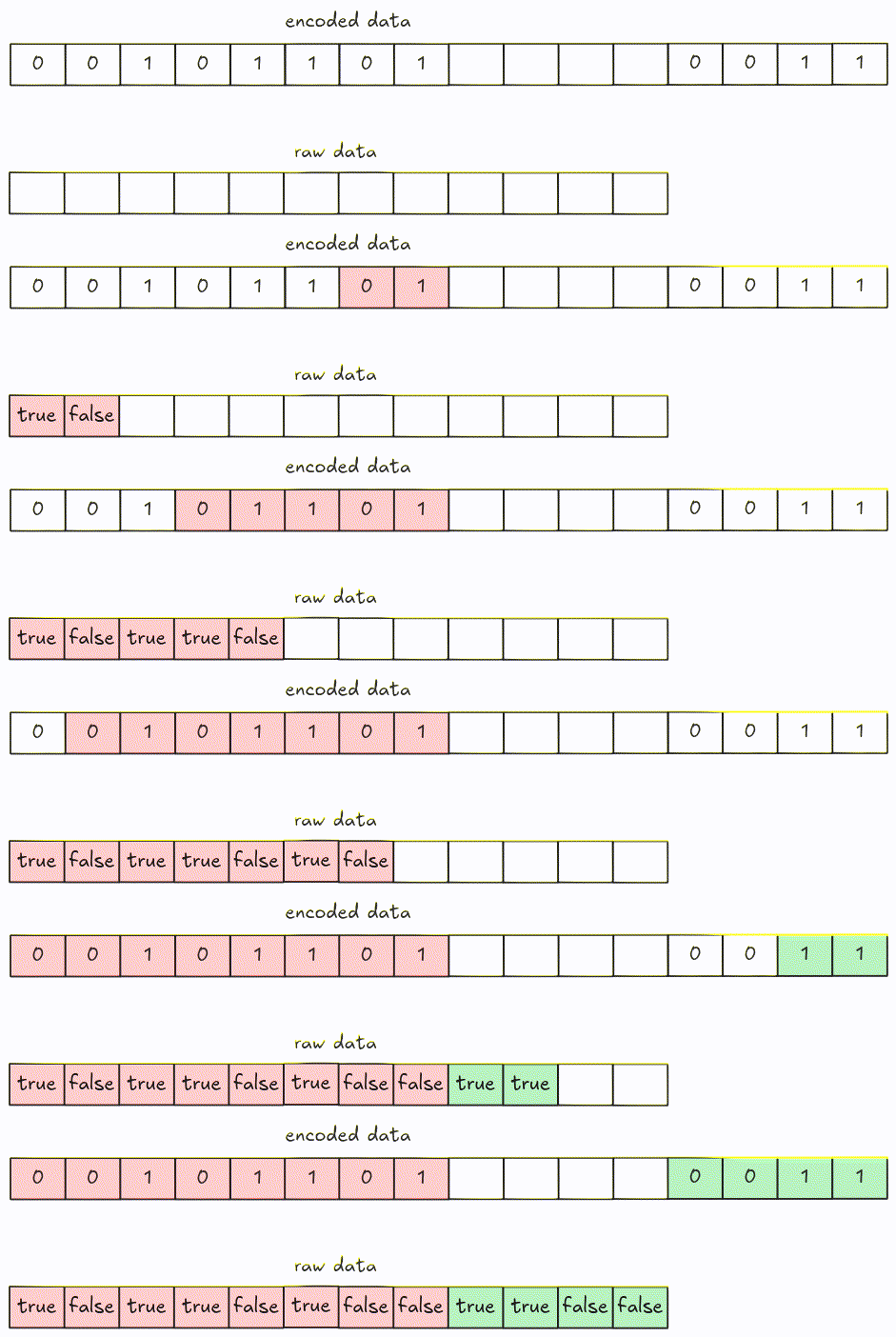
You can optimize decoding by fetching more than 8 bits at a time (i.e. 32 bits).
Task
bit_packed_decode
Implement the bit_packed_decode function in src/decoder/bit_packed.rs. It takes the encoded page
data as Bytes and returns a decoded vector of Scalar.
pub fn bit_packed_decode(
    encoded_data: Bytes,
    parquet_type: Type,
    bit_width: u8,
    num_values: usize,
) -> Result<Vec<Scalar>> {
    todo!("step09: implement the boolean data decoder")
}
For boolean data, the bit-width is always 1.
plain_decode
Update the plain_decode in src/decoder/plain.rs function to handle boolean data type.
pub fn plain_decode(
    encoded_data: Bytes,
    parquet_type: Type,
    num_values: usize,
) -> Result<Vec<Scalar>> {
    match parquet_type {
        // ...
        Type::BOOLEAN => todo!("step09: decode boolean"),
        // ...
    }
}
Test
Test case for this step is step09_boolean_column.
Hints and Solution
Hint (decoding steps)
- Fetch the data each 8 bits at a time. (You can optimize by reading 4 bytes at a time in little endian).
- Shift right until there are no bits left or until you get enough values.
- Create vector of boolean
Scalar.
Solution
bit_packed_decode:
pub fn bit_packed_decode(
    encoded_data: Bytes,
    parquet_type: Type,
    bit_width: u8,
    num_values: usize,
) -> Result<Vec<Scalar>> {
    let mut encoded_data = encoded_data;
    let mut needed = num_values;
    let mut scalars = Vec::with_capacity(num_values);
    while needed > 0 {
        let group = encoded_data.get_u8();
        for i in 0..needed.min(8) {
            scalars.push(Scalar::from(group >> i & 1 == 1));
        }
        needed = needed.saturating_sub(8);
    }
    Ok(scalars)
}plain_decode:
pub fn plain_decode(
    encoded_data: Bytes,
    parquet_type: Type,
    num_values: usize,
) -> Result<Vec<Scalar>> {
    let mut encoded_data = encoded_data;
    let mut scalars = Vec::with_capacity(num_values);

    match parquet_type {
        // ...
        Type::BOOLEAN => scalars = bit_packed_decode(encoded_data, Type::BOOLEAN, 1, num_values)?,
        // ...
    }

    Ok(scalars)
}
Bonus: Interactive Testing
The parser can now read boolean data. Let’s test it!
Data
The CSV data is in data/boolean.csv.
column
true
false
true
true
false
false
true
true
Command
# convert to parquet
cargo run write data/boolean.csv boolean.parquet

# read it
cargo run read boolean.parquet
Result
    Finished `dev` profile [unoptimized + debuginfo] target(s) in 0.18s
     Running `target/debug/parquet-parser read boolean.parquet`
shape: (8, 1)
┌────────┐
│ column │
│ ---    │
│ bool   │
╞════════╡
│ true   │
│ false  │
│ true   │
│ true   │
│ false  │
│ false  │
│ true   │
│ true   │
└────────┘
RLE Bit-packing Hybrid Decoder
Until now, the parser can only read files with PLAIN Encoding. In the upcoming tasks, we will handle RLE Bit-packing Hybrid Encoding, this will be much more fun (and harder)!
From the spec, only these types of data are supported:
- Repetition and definition levels
- Dictionary indices
- Boolean values in data pages, as an alternative to PLAIN encoding
We will handle all of them eventually, but let’s first go with the boolean values (because it is the easiest).
RLE
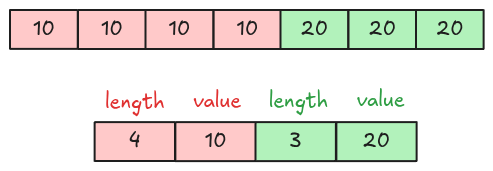
The Boolean Data section explains the bit-packed encoding. For RLE (Run Length Encoding), the data is encoded using 2 pieces of information: the run length and the repeated value. Below is an example of encoding 10, 10, 10, 10, 20, 20, 20.
RLE Bit-packing Hybrid Encoding
RLE Bit-packing Hybrid encoded data contains a 4-byte length and multiple encoded runs written back to back. A run can be either an RLE run or a bit-packed run, and contains two parts: a run header and the encoded values (both are themselves encoded!).
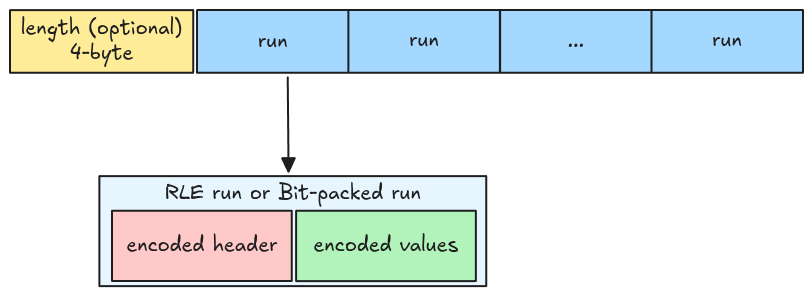
Implementation
For a rough implementation, we start by decoding an individual run header, then extracting all the runs, and finally decoding all of them.
Run header decoder (ULEB128 Decoder)
A run header is an integer encoded using ULEB-128 encoding, Wikipedia has a very well-explained encoding example for 624485.
MSB ------------------ LSB
      10011000011101100101  In raw binary
     010011000011101100101  Padded to a multiple of 7 bits
 0100110  0001110  1100101  Split into 7-bit groups
00100110 10001110 11100101  Add high 1 bits on all but last (most significant) group to form bytes
    0x26     0x8E     0xE5  In hexadecimal

→ 0xE5 0x8E 0x26            Output stream (LSB to MSB)
One important note is that the last byte has its MSB set to 0 instead of 1; this signals the
decoder to stop fetching bytes when decoding data.
Decode
Decoding is a reverse operation: it strips the MSB (Most Significant Bit) in each byte, and packs them together. Let’s visualize it.
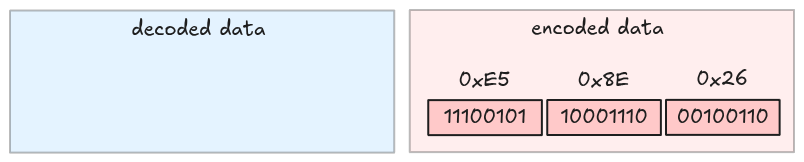
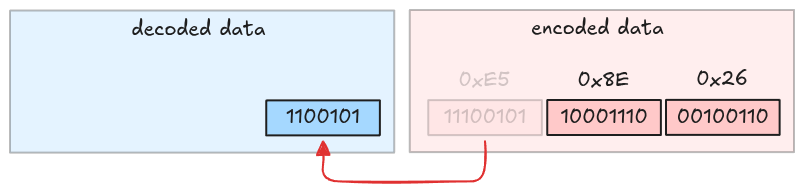
Take the first byte and strip its MSB.
Take the second byte and strip its MSB.
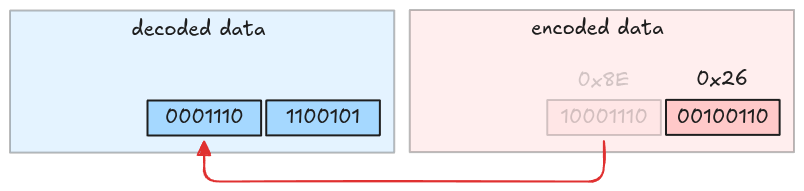
Take the third byte and strip its MSB. This is also the last byte because its MSB is 0.
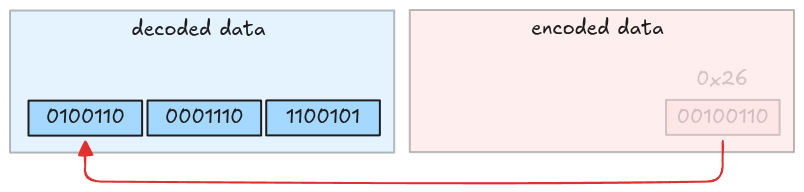
The decoded value is 010011000011101100101, which is 624485.
Task
Implement the uleb128_decode function in src/decoder/uleb128.rs. It takes the encoded Bytes
and returns a decoded integer with the remaining bytes.
pub fn uleb128_decode(encoded_data: Bytes) -> Result<(u64, Bytes)> {
    todo!("step10-01: implement uleb128 decoder")
}
Test
Test case for this step is step10_01_uleb128_decoder.
Hints and Solution
Hint
There is no hint for this task.
Solution
pub fn uleb128_decode(encoded_data: Bytes) -> Result<(u64, Bytes)> {
    let mut encoded_data = encoded_data;
    let mut result = 0u64;

    let total_bytes = encoded_data.len();
    for i in 0..total_bytes {
        let byte = encoded_data.get_u8() as u64;
        result |= (byte & 0x7F) << (i * 7);
        // MSB = 0, stop
        if byte & 0x80 == 0 {
            return Ok((result, encoded_data));
        }
    }
    bail!("uleb128_decode: no byte with leading 0")
}
Run
In this step, we will extract information for a single run, including a run header and its encoded values.
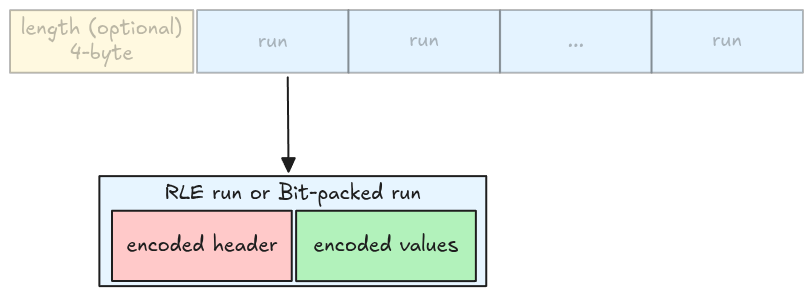
Run header
A run header is an integer containing 2 pieces of information:
- An indicator bit that tells us whether a run is an RLE run or a bit-packed run. This is stored in the LSB: 0 means RLE, 1 otherwise.
- The run length: determines how many values in the run. This is an integer represented using the remaining bits (without the LSB).
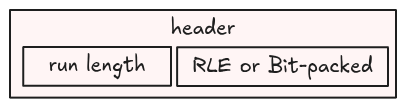
For example, if the run header is 13 (represented as 1101 in binary), then:
- LSB is 1, which is a bit-packed run
- Run length is 6 (
110in binary)
RLE run
From the RLE encoding spec, an RLE run has some properties:
- The LSB is 0
- The RLE run length (the number of values) equals the run length information in the header
- The repeated value is stored in the encoded data, using the round up to the next byte bit-width. For example, if the bit-width is 1, then it needs 1 byte; if the bit-width is 9, then it needs 2 bytes.
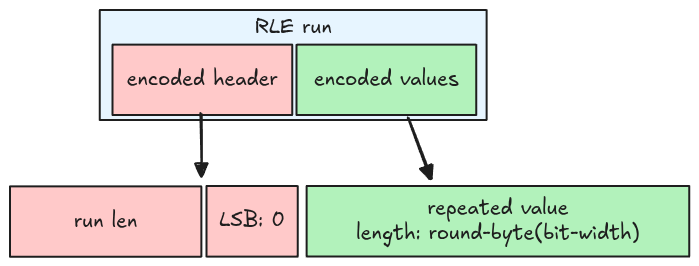
Bit-packed run
For a bit-packed run:
- The LSB is 1
- The bit-packed run length (the number of values) is the header’s run length multiplied by 8.
- The values are encoded using bit-packed encoding, the total bits needed is the bit-width multiplied by the number of values.
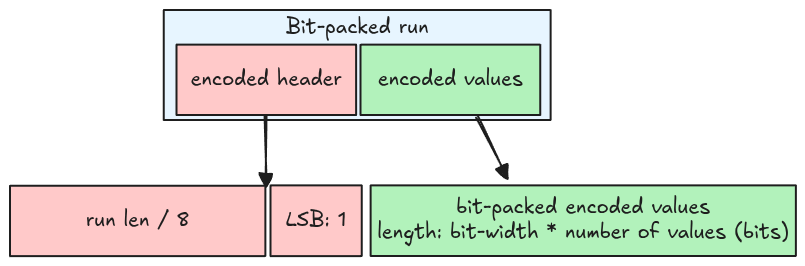
A bit-packed run stores a multiple of 8 values at a time, thus it might contain garbage. For example, if the bit-width is 1, and the number of values is 2, then the run stores 8 values (run length is 8), of which 6 are garbage.
Code representation
A run is represented using an enum RleBitPackedRun. All members are the same as introduced in the
above sections.
pub enum RleBitPackedRun {
    Rle {
        run_len: usize,
        bit_width: u8,
        encoded_values: Bytes,
    },
    BitPacked {
        run_len: usize,
        bit_width: u8,
        encoded_values: Bytes,
    },
}
Task
Implement the read_rle_bit_packed_run function in src/decoder/rle_bit_packing_hybrid.rs. It
takes the encoded page data (the packed multiple runs data) as Bytes, and returns a correct run
with the remaining bytes.
pub fn read_rle_bit_packed_run(
    encoded_data: Bytes,
    bit_width: u8,
) -> Result<(RleBitPackedRun, Bytes)> {
    todo!("step10-02: extract a single run")
}
Note that you only need to extract the encoded values in bytes, not decoding it.
Test
Test case for this step is step10_02_run.
Hints and Solution
Hint (how to decode the header)
Use uleb128_decode function to extract the header.
Hint (how to extract LSB and the run length)
let lsb = header & 1;
let length = header >> 1;
Hint (how to extract RLE repeated value)
Calculate the bytes needed for the repeated value using the provided bit-width, then use this value to extract the repeated value.
let needed_bytes = bit_width.div_ceil(8);Hint (how to extract bit-packed values)
Get the number of bytes needed for the run, then use this value to extract the encoded values.
let needed_bytes = run_len * bit_width / 8;Solution
pub fn read_rle_bit_packed_run(
    encoded_data: Bytes,
    bit_width: u8,
) -> Result<(RleBitPackedRun, Bytes)> {
    let (header, mut remaining) = uleb128_decode(encoded_data)?;
    let lsb = header & 1;
    let length = (header >> 1) as usize;

    let run = if lsb == 0 {
        let needed_bytes = bit_width.div_ceil(8) as usize;
        let encoded_values = remaining.split_to(needed_bytes);

        RleBitPackedRun::Rle {
            run_len: length,
            bit_width,
            encoded_values,
        }
    } else {
        let run_len = length * 8;
        let needed_bytes = run_len * bit_width as usize / 8;
        let encoded_values = remaining.split_to(needed_bytes);

        RleBitPackedRun::BitPacked {
            run_len,
            bit_width,
            encoded_values,
        }
    };

    Ok((run, remaining))
}
Runs
In this step, we will extract all the runs for a page encoded using RLE Bit-packing Hybrid Encoding.
The length is optional and might not be included, this is documented in the spec.
| Page kind | RLE-encoded data kind | Prepend length? |
|---|---|---|
| Data page v1 | Definition levels | Y |
| Repetition levels | Y | |
| Dictionary indices | N | |
| Boolean values | Y |
Task
Implement the read_rle_bit_packed_runs function in src/decoder/rle_bit_packing_hybrid.rs. It
takes the encoded page and returns all the runs.
pub fn read_rle_bit_packed_runs(
    encoded_data: Bytes,
    bit_width: u8,
    prepend_length: bool,
) -> Result<Vec<RleBitPackedRun>> {
    todo!("step10-03: extract all runs")
}
You need to check the prepend_length argument to correctly extract the multiple packed runs.
Test
Test case for this step is step10_03_runs.
Hints and Solution
Hint (how to get all the runs)
Similar to the Data Page section, you should extract the run from the encoded data until there are no bytes left.
while !page_data.is_empty() {
    let (run, remaining) = read_rle_bit_packed_run(/* ... */);
    // ...
    page_data = remaining;
}
Solution
pub fn read_rle_bit_packed_runs(
    encoded_data: Bytes,
    bit_width: u8,
    prepend_length: bool,
) -> Result<Vec<RleBitPackedRun>> {
    let mut encoded_data = encoded_data;

    if prepend_length {
        let length = encoded_data.get_u32_le();
        encoded_data = encoded_data.slice(..length as usize);
    }

    let mut runs = Vec::new();
    while !encoded_data.is_empty() {
        let (run, remaining) = read_rle_bit_packed_run(encoded_data, bit_width)?;
        runs.push(run);
        encoded_data = remaining;
    }

    Ok(runs)
}
Run Decoder
In this step, we will decode an RLE Bit-packing Hybrid run.
As you might have guessed, we need 2 decoders, one for an RLE run, and the other for a bit-packed run. Since we have already handled the latter in Boolean Data section, we only need to implement an RLE decoder.
RLE decoder
Recall from the RLE definition, an RLE run contains a run length and repeated value. Decoding it is just duplicating the repeated value with the run length.
Task
You will implement two functions for decoding an RLE run and an RLE Bit-packing Hybrid run.
rle_decode
Implement the rle_decode function in src/decoder/rle.rs. It takes the encoded repeated value as
Bytes and returns a decoded vector of Scalar.
pub fn rle_decode(
    encoded_data: Bytes,
    parquet_type: Type,
    bit_width: u8,
    num_values: usize,
) -> Result<Vec<Scalar>> {
    todo!("step10-04: decode a rle run")
}
The data type is always boolean with 1-bit width.
rle_bit_packing_hybrid_run_decode
Implement the rle_bit_packing_hybrid_run_decode function in
src/decoder/rle_bit_packing_hybrid.rs. It takes a run and returns a decoded vector of Scalar.
pub fn rle_bit_packing_hybrid_run_decode(
    run: RleBitPackedRun,
    parquet_type: Type,
) -> Result<Vec<Scalar>> {
    todo!("step10-04: decode a single run")
}
Test
Test case for this step is step10_04_run_decoder.
Hints and Solution
Hint (how to decode an RLE run)
An RLE run is just a bit-packed run where the number of values is 1.
Solution
rle_decode:
pub fn rle_decode(
    encoded_data: Bytes,
    parquet_type: Type,
    bit_width: u8,
    num_values: usize,
) -> Result<Vec<Scalar>> {
    let scalar = bit_packed_decode(encoded_data, parquet_type, bit_width, 1)?
        .pop()
        .with_context(|| "rle_decode: cannot get decoded scalar from `bit_packed_decode`")?;
    let scalars = vec![scalar; num_values];
    Ok(scalars)
}rle_bit_packing_hybrid_run_decode:
pub fn rle_bit_packing_hybrid_run_decode(
    run: RleBitPackedRun,
    parquet_type: Type,
) -> Result<Vec<Scalar>> {
    match run {
        RleBitPackedRun::Rle {
            run_len,
            bit_width,
            encoded_values,
        } => rle_decode(encoded_values, parquet_type, bit_width, run_len),
        RleBitPackedRun::BitPacked {
            run_len,
            bit_width,
            encoded_values,
        } => bit_packed_decode(encoded_values, parquet_type, bit_width, run_len),
    }
}
Runs Decoder
We have everything we need to decode the RLE Bit-packing Hybrid encoded data. Let’s apply it to our parser.
For now we only handle the encoded boolean values; this means the length must be included.
| Page kind | RLE-encoded data kind | Prepend length? |
|---|---|---|
| Data page v1 | Definition levels | Y |
| Repetition levels | Y | |
| Dictionary indices | N | |
| Boolean values | Y |
Task
rle_bit_packing_hybrid_decode
Implement the rle_bit_packing_hybrid_decode function in src/decoder/rle_bit_packing_hybrid.rs.
It takes the encoded page data and returns a decoded vector of Scalar.
pub fn rle_bit_packing_hybrid_decode(
    encoded_data: Bytes,
    parquet_type: Type,
    bit_width: u8,
    num_values: usize,
    prepend_length: bool,
) -> Result<Vec<Scalar>> {
    todo!("step10-05: decode all runs")
}
Because a bit-packed run might contain garbage, the
num_values might not equal the total number of values in all pages.
decode_page
Update the match arm Encoding::RLE in src/decoder/mod.rs. Again, the data type is always boolean
with 1 bit-width.
pub fn decode_page(page: &Page, parquet_type: Type, num_values: usize) -> Result<Vec<Scalar>> {
    match page.encoding() {
        // ...
        Encoding::RLE => todo!("step10-05: rle bit-packing hybrid decoder"),
        // ...
    }
}
Test
Test case for this step is step10_05_runs_decoder.
Hints and Solution
Hint (steps)
- Extract all the runs
- Decode each run and concatenate the result
- Handle the number of values in the final result
Solution
rle_bit_packing_hybrid_decode:
pub fn rle_bit_packing_hybrid_decode(
    encoded_data: Bytes,
    parquet_type: Type,
    bit_width: u8,
    num_values: usize,
    prepend_length: bool,
) -> Result<Vec<Scalar>> {
    let runs = read_rle_bit_packed_runs(encoded_data, bit_width, prepend_length)?;
    let mut result = Vec::with_capacity(num_values);
    for run in runs {
        let scalars = rle_bit_packing_hybrid_run_decode(run, parquet_type)?;
        result.extend(scalars);
    }
    result.truncate(num_values);
    Ok(result)
}decode_data_page:
pub fn decode_page(page: &Page, parquet_type: Type, num_values: usize) -> Result<Vec<Scalar>> {
    match page.encoding() {
        // ...
        Encoding::RLE => {
            rle_bit_packing_hybrid_decode(page.encoded_values(), parquet_type, 1, num_values, true)
        }
        // ...
    }
}
Bonus: Interactive Testing
The parser can now read data encoded with RLE Bit-packed Hybrid Encoding. Let’s test it!
Data
The CSV data is in data/all.csv.
col_bool,col_integer,col_real,col_string
true,1,1.1,one
false,2,2.2,two
true,3,3.3,three
true,4,4.4,four
false,5,5.5,five
false,6,6.6,six
true,7,7.7,seven
true,8,8.8,eight
Command
To write to a parquet file using RLE Bit-packed Hybrid Encoding, set the encoding flag
--encodings <COLUMN_NAME>=rle
# write csv to a parquet file
cargo run write data/all.csv all.parquet --encodings col_bool=rle

# read the parquet file
cargo run read all.parquet
Result
    Finished `dev` profile [unoptimized + debuginfo] target(s) in 0.18s
     Running `target/debug/parquet-parser read all.parquet`
shape: (8, 4)
┌──────────┬─────────────┬──────────┬────────────┐
│ col_bool ┆ col_integer ┆ col_real ┆ col_string │
│ ---      ┆ ---         ┆ ---      ┆ ---        │
│ bool     ┆ i64         ┆ f64      ┆ str        │
╞══════════╪═════════════╪══════════╪════════════╡
│ true     ┆ 1           ┆ 1.1      ┆ one        │
│ false    ┆ 2           ┆ 2.2      ┆ two        │
│ true     ┆ 3           ┆ 3.3      ┆ three      │
│ true     ┆ 4           ┆ 4.4      ┆ four       │
│ false    ┆ 5           ┆ 5.5      ┆ five       │
│ false    ┆ 6           ┆ 6.6      ┆ six        │
│ true     ┆ 7           ┆ 7.7      ┆ seven      │
│ true     ┆ 8           ┆ 8.8      ┆ eight      │
└──────────┴─────────────┴──────────┴────────────┘
Metadata
You can see from the metadata, the boolean column is encoded using RLE (no PLAIN included).
cargo run metadata all.parquet
    Finished `dev` profile [unoptimized + debuginfo] target(s) in 0.18s
     Running `target/debug/parquet-parser metadata all.parquet`
...
column 0:
--------------------------------------------------------------------------------
column type: BOOLEAN
column path: "col_bool"
encodings: RLE
...

column 1:
--------------------------------------------------------------------------------
column type: INT64
column path: "col_integer"
encodings: PLAIN RLE
...
Nulls
In the upcoming steps, we will handle columns with missing data (NULL). There are two important notes:
- NULL values aren’t encoded in the data page
- NULL information are stored in the definition levels
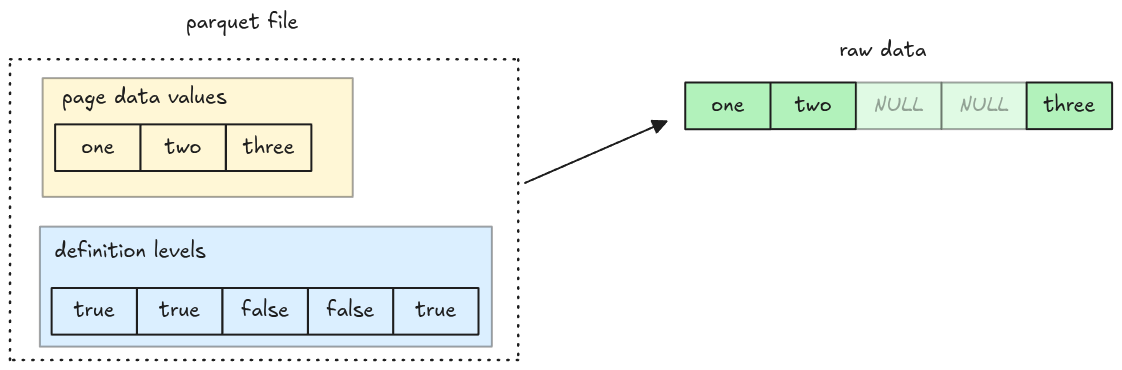
Definition Levels Decoder
Definition levels data is stored in the Data Page. It is a
null map indicating which values exist in a page: true means the value is present, false
otherwise.
The definition levels data itself is encoded using RLE Bit-packed Hybrid Encoding for boolean data, which we have already implemented in the previous steps! To represent the null map in code, we simply use a vector of booleans.
Task
Implement the decode_definition_levels function in src/nulls.rs. It takes a Page::DataPage and
returns a null map.
pub fn decode_definition_levels(page: &Page) -> Result<Vec<bool>> {
    todo!("step11-01: decode definition levels")
}
Test
Test case for this step is step11_01_definition_levels_decoder.
Hints and Solution
Hint (how to convert a Scalar to boolean)
To convert a Scalar to boolean, you can use
into_value and
extract_bool
let exist = scalar.into_value().extract_bool()Solution
pub fn decode_definition_levels(page: &Page) -> Result<Vec<bool>> {
    let definition_levels = page
        .definition_levels()
        .with_context(|| "decode_definition_levels: receive non data page")?;

    let decoded_scalars = rle_bit_packing_hybrid_decode(
        definition_levels,
        Type::BOOLEAN,
        1,
        page.num_values(),
        true,
    )?;

    let is_present: Option<Vec<bool>> = decoded_scalars
        .into_iter()
        .map(|v| v.into_value().extract_bool())
        .collect();

    let is_present =
        is_present.with_context(|| "decode_definition_levels: invalid definition levels")?;

    Ok(is_present)
}
Nulls Decoder
In this step, we will add missing entries to decoded columns. One thing to note is that the data
page doesn’t include the missing entries in its encoded data (even though num_values still refers
to the total values in a page).
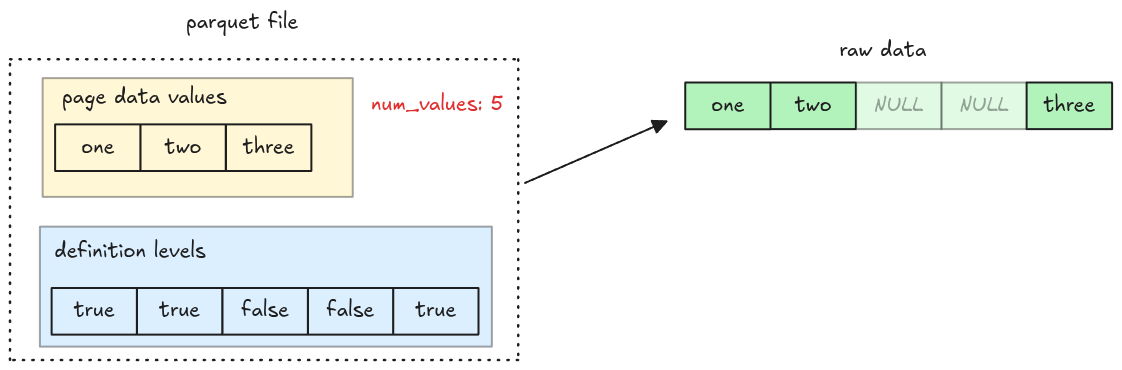
Task
add_nulls_entries
Implement the add_nulls_entries function in src/nulls.rs. It takes a null map, a decoded vector
of Scalar, and returns a new vector of Scalar containing null entries.
pub fn add_nulls_entries(
    is_present: &[bool],
    scalars: Vec<Scalar>,
    parquet_type: Type,
) -> Result<Vec<Scalar>> {
    todo!("step11-02: handle nulls in a column")
}
To create a null Scalar, you might find the scalar_null helper useful.
read_column
Update the read_column function to handle null values. You should compute the null map and add
missing entries to the decoded column.
pub fn read_column(data: Bytes, column_chunk: &ColumnChunk) -> Result<Column> {
    // ...
}
The decode_page function needs the actual number of values encoded in a page to decode the data.
However the num_values in the page header is the total number of values including nulls. You must
handle them correctly when decoding a page.
Test
Test case for this step is step11_02_nulls_decoder.
Hints and Solution
Solution
add_nulls_entries:
pub fn add_nulls_entries(
    is_present: &[bool],
    scalars: Vec<Scalar>,
    parquet_type: Type,
) -> Result<Vec<Scalar>> {
    let mut scalars = scalars;
    scalars.reverse();

    let mut result = Vec::with_capacity(is_present.len());
    for present in is_present {
        if *present {
            result.push(scalars.pop().with_context(
                || "add_nulls_entries: scalars is empty! the nulls map isn't correct",
            )?);
        } else {
            result.push(Scalar::null(parquet_to_polars_type(parquet_type)))
        }
    }

    Ok(result)
}read_column:
pub fn read_column(data: Bytes, column_chunk: &ColumnChunk) -> Result<Column> {
    // ...
    for page in pages.data_pages {
        // compute the null map from the definition levels
        let is_present = decode_definition_levels(&page)?;
        // compute the actual number of values encoded in a page
        let num_values = is_present.iter().filter(|v| **v).count();

        let decoded_scalars = decode_page(&page, column_metadata.type_, num_values)?;
        let decoded_scalars =
            add_nulls_entries(&is_present, decoded_scalars, column_metadata.type_)?;

        scalars.extend(decoded_scalars);
    }
    // ...
}
Bonus: Interactive Testing
The parser can now read data with NULL values. Let’s test it!
Data
The data is in data/nulls.csv.
col_i64,col_string
1,one
2,two
,
,
3,three
4,four
5,five
,
Command
# write csv to a parquet file
cargo run write data/nulls.csv nulls.parquet

# read the parquet file
cargo run read nulls.parquet
Result
You can see there are null values added.
    Finished `dev` profile [unoptimized + debuginfo] target(s) in 0.18s
     Running `target/debug/parquet-parser read nulls.parquet`
shape: (8, 2)
┌─────────┬────────────┐
│ col_i64 ┆ col_string │
│ ---     ┆ ---        │
│ i64     ┆ str        │
╞═════════╪════════════╡
│ 1       ┆ one        │
│ 2       ┆ two        │
│ null    ┆ null       │
│ null    ┆ null       │
│ 3       ┆ three      │
│ 4       ┆ four       │
│ 5       ┆ five       │
│ null    ┆ null       │
└─────────┴────────────┘
Dictionary Decoder
In the upcoming steps, we decode pages with Dictionary Encoding.
Dictionary Encoding
Dictionary encoding encodes data in 2 places:
- A dictionary page: stores actual values encoded using Plain Encoding, which we have fully implemented
- Multiple Data pages: store value’s indexes (in integers) encoded using RLE Bit-packing Hybrid Encoding. However, the RLE Bit-packing Hybrid decoder can only work with booleans at the moment
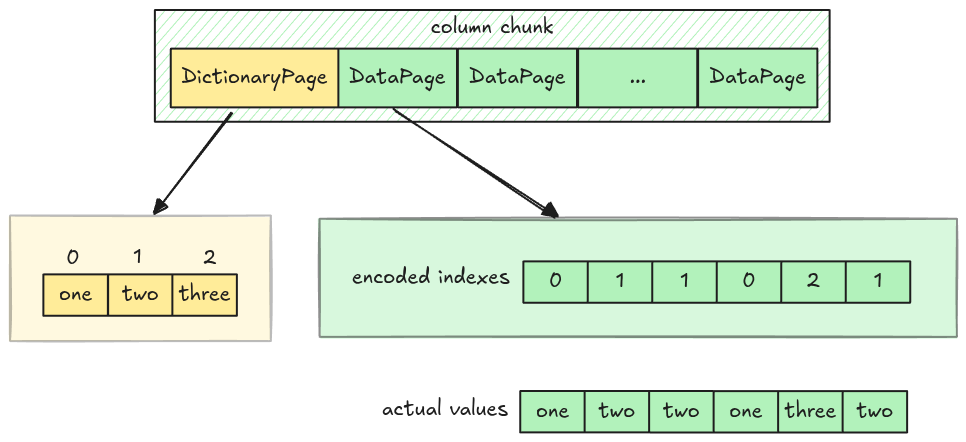
Implementation
The implementation flow is a bit unusual. We first teach the parser about dictionary page, then parse columns in dictionary encoding with at most two unique values, and finally make them work with arbitrary number of values.
Dictionary Page
The dictionary page, if exists, will be placed at the first page in a column chunk. Its position is
stored in the dictionary_page_offset field in the column metadata.
Dictionary Page Layout
Unlike Data Page Layout, the dictionary page layout is very simple, just a header with encoded values.
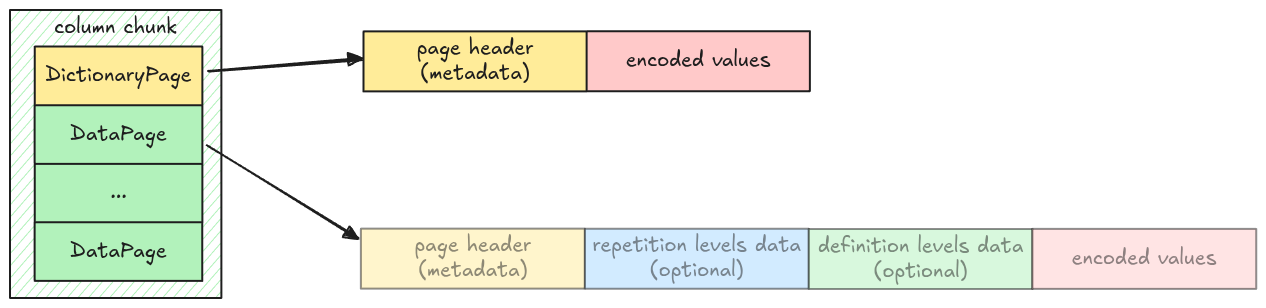
This is represented in code as an enum variant Page::DictionaryPage in src/page.rs.
pub enum Page {
    // ...
    DictionaryPage {
        page_header: PageHeader,
        encoded_values: Bytes,
    },
}
A column might or might not contain a dictionary page, which is represented as an optional field
dictionary_page in Pages:
pub struct Pages {
    pub data_pages: Vec<Page>,
    pub dictionary_page: Option<Page>,
}
Dictionary Page Decoder
The dictionary page can be decoded using Plain decoder. The decoded result is a vector of entries, which data pages can refer to using value’s indexes.
Task
read_page
Update the read_page function in src/page.rs, make it work with Page::DictionaryPage.
pub fn read_page(data: Bytes, codec: CompressionCodec) -> Result<(Page, Bytes)> {
    // ...
}
read_pages
Update the read_pages function in src/page.rs, make it work when there is a dictionary page. You
might find the Page::is_dictionary() helper function useful.
pub fn read_pages(data: Bytes, column_metadata: &ColumnMetaData) -> Result<Pages> {
    // ...
}
dictionary_entries
Implement the dictionary_entries function in src/dictionary.rs. It takes a Pages and returns a
decoded dictionary entries as a vector of Scalar if exists.
pub fn dictionary_entries(pages: &Pages, parquet_type: Type) -> Result<Option<Vec<Scalar>>> {
    todo!("step12-01: extract dictionary entries from dictionary page")
}
Test
Test case for this step is step12_01_dictionary_page.
Hints and Solution
Hint (how to get the correct page offset)
Use dictionary_page_offset, if it is None, take data_page_offset instead.
let offset = column_metadata
    .dictionary_page_offset
    .unwrap_or(column_metadata.data_page_offset) as usize;
Solution
read_page:
pub fn read_page(data: Bytes, codec: CompressionCodec) -> Result<(Page, Bytes)> {
    // ...
    let page = match page_header.type_ {
        // ...
        PageType::DICTIONARY_PAGE => Page::DictionaryPage {
            page_header,
            encoded_values: page_data,
        },
      // ...
}read_pages:
pub fn read_pages(data: Bytes, column_metadata: &ColumnMetaData) -> Result<Pages> {
    let offset = column_metadata
        .dictionary_page_offset
        .unwrap_or(column_metadata.data_page_offset) as usize;
    let len = column_metadata.total_compressed_size as usize;

    let mut pages_bytes = data.slice(offset..offset + len);
    let mut data_pages = vec![];
    let mut dictionary_page = None;

    while !pages_bytes.is_empty() {
        let (page, remaining) = read_page(pages_bytes, column_metadata.codec)?;
        if page.is_dictionary() {
            dictionary_page = Some(page);
        } else {
            data_pages.push(page);
        }
        pages_bytes = remaining;
    }

    Ok(Pages {
        data_pages,
        dictionary_page,
    })
}dictionary_entries:
pub fn dictionary_entries(pages: &Pages, parquet_type: Type) -> Result<Option<Vec<Scalar>>> {
    let dictionary_entries = match &pages.dictionary_page {
        Some(page) => {
            let dictionary_entries = decode_page(page, parquet_type, page.num_values())?;
            Some(dictionary_entries)
        }
        None => None,
    };
    Ok(dictionary_entries)
}
Dictionary Decoder (two values)
The current RLE Bit-packing Hybrid decoder, which can only decode boolean values, cannot completely decode data pages containing integer indexes in dictionary encoding.
However, we can make it work for an edge case: Columns with only two unique values. Because data
pages only require 0 and 1 and their indexes, they can be decoded as boolean and converted to
integers. (false for 0 and true for 1).
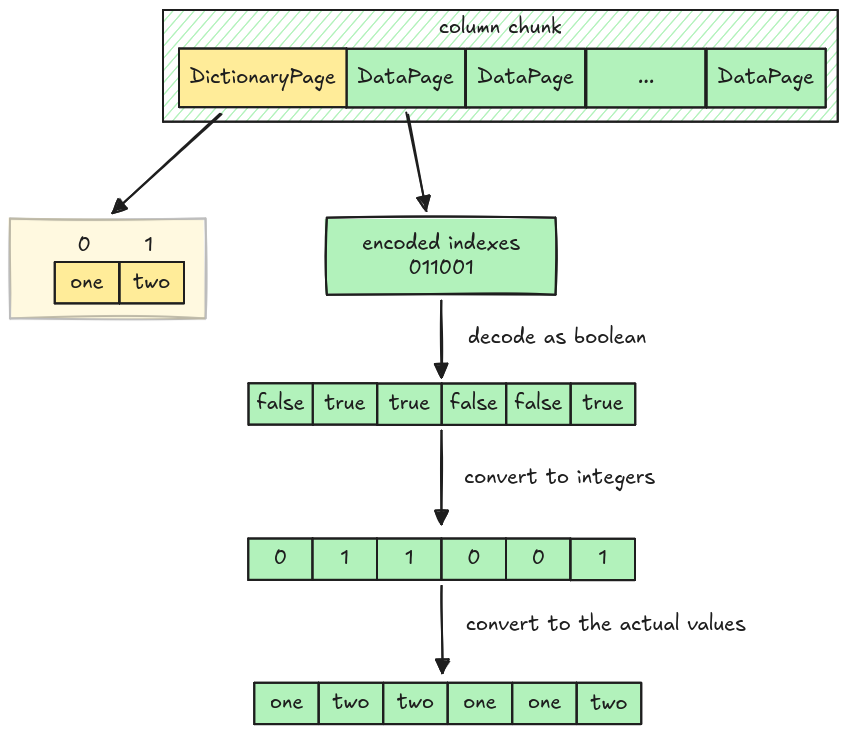
Data Page Layout in Dictionary Encoding
The data page layout in dictionary encoding is different from normal Data Page Layout. It only has two parts:
- Bit-width: 1 byte
- Encoded data: RLE Bit-packing hybrid encoded data (No prepended length)
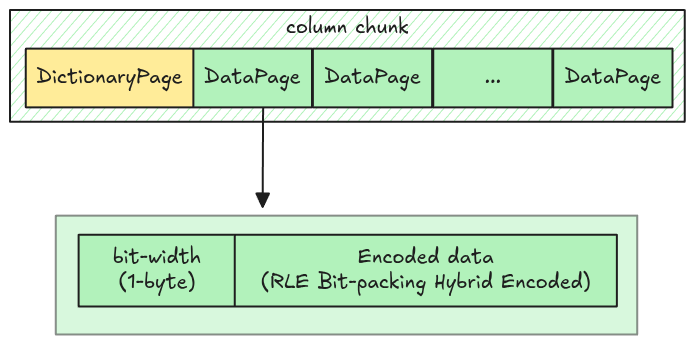
Parquet uses RLE_DICTIONARY as the encoding name to distinguish it from the RLE used in normal
data pages.
Task
dictionary_decode
Implement the dictionary_decode function in src/decoder/dictionary.rs. It decodes a data page
into vector of Scalar containing indexes.
pub fn dictionary_decode(encoded_data: Bytes, num_values: usize) -> Result<Vec<Scalar>> {
    todo!("step12-02: dictionary decoder")
}
decode_page
Update the decode_page function in src/decoder/mod.rs to handle the Encoding::RLE_DICTIONARY
arm.
pub fn decode_page(page: &Page, parquet_type: Type, num_values: usize) -> Result<Vec<Scalar>> {
    match page.encoding() {
        // ...
        Encoding::RLE_DICTIONARY => todo!("step12-02: dictionary decoder"),
        // ...
    }
}
map_dictionary_entries
Implement the map_dictionary_entries function in src/dictionary.rs. It takes a dictionary
entries, the value’s indexes, and returns the actual column values. Since the dictionary page might
or might not exist for a given column chunk, the dictionary entries is passed as an optional
argument.
pub fn map_dictionary_entries(
    dictionary_entries: &Option<Vec<Scalar>>,
    indexes_or_values: Vec<Scalar>,
) -> Result<Vec<Scalar>> {
    todo!("step12-02: map indexes in data page to the exact values")
}
read_column
Handle dictionary page in the read_column in src/column.rs. It must extract the dictionary
entries and map with indexes from data pages.
pub fn read_column(data: Bytes, column_chunk: &ColumnChunk) -> Result<Column> {
    // ...
}
Test
Test case for this step is step12_02_dictionary_decoder_two_values.
Hints and Solution
Hint (how to decode data page in dictionary encoding)
First, extract the bit-width from the encoded data, then call the rle_bit_packing_hybrid_decode.
You can convert the decoded data to integer right here, or cast them later in
map_dictionary_entries.
Hint (how to map the entries)
Traverse through the indexes, convert them to integer and perform the look up from the dictionary entries.
for index in indexes {
    let index = index.into_value().try_extract::<i32>()? as usize;
    // look up in the entries using the index
}
Hint (how to get the column type for a dictionary page)
The column type for a dictionary page is the exact type in the column metadata.
Solution
dictionary_decode:
pub fn dictionary_decode(encoded_data: Bytes, num_values: usize) -> Result<Vec<Scalar>> {
    let mut encoded_data = encoded_data;
    let bit_width = encoded_data.get_u8();
    rle_bit_packing_hybrid_decode(encoded_data, Type::INT32, bit_width, num_values, false)
}decode_page:
pub fn decode_page(page: &Page, parquet_type: Type, num_values: usize) -> Result<Vec<Scalar>> {
    match page.encoding() {
        // ...
        Encoding::RLE_DICTIONARY => dictionary_decode(page.encoded_values(), num_values),
        // ...
}map_dictionary_entries:
pub fn map_dictionary_entries(
    dictionary_entries: &Option<Vec<Scalar>>,
    indexes_or_values: Vec<Scalar>,
) -> Result<Vec<Scalar>> {
    let Some(dictionary_entries) = dictionary_entries else {
        return Ok(indexes_or_values);
    };
    let mut scalars = Vec::with_capacity(indexes_or_values.len());
    for index in indexes_or_values {
        let index = index.into_value().try_extract::<i32>()? as usize;
        let scalar = dictionary_entries[index].clone();
        scalars.push(scalar)
    }
    Ok(scalars)
}read_column:
pub fn read_column(data: Bytes, column_chunk: &ColumnChunk) -> Result<Column> {
    // ...
    let pages = read_pages(data, column_metadata)?;
    let dictionary_entries = dictionary_entries(&pages, column_metadata.type_)?;
    // ...
    for page in pages.data_pages {
        // ...
        let num_values = is_present.iter().filter(|v| **v).count();

        let indexes_or_values = decode_page(&page, column_metadata.type_, num_values)?;
        let decoded_scalars = map_dictionary_entries(&dictionary_entries, indexes_or_values)?;
        // ...
}
Dictionary Decoder (one value)
If all the values for a given column are the same, then:
- The dictionary page only has 1 value
- All the data pages store 0 as their bit-width and no encoded indexes are stored.
You should handle this case correctly to avoid panicking when there is no encoded indexes.
Task
Update the dictionary_decode function in src/decoder/dictionary.rs to handle a bit-width of 0.
pub fn dictionary_decode(encoded_data: Bytes, num_values: usize) -> Result<Vec<Scalar>> {
    // ...
}
Test
Test case for this step is step12_03_dictionary_decoder_one_value.
Hints and Solution
Solution
pub fn dictionary_decode(encoded_data: Bytes, num_values: usize) -> Result<Vec<Scalar>> {
    let mut encoded_data = encoded_data;
    let bit_width = encoded_data.get_u8();
    if bit_width == 0 {
        return Ok(vec![Scalar::from(0); num_values]);
    }
    rle_bit_packing_hybrid_decode(encoded_data, Type::INT32, bit_width, num_values, false)
}
Bit-packed Integers
We have implemented the dictionary decoder for 2 values and 1 value. This time, we make it work with any number of unique values. This means the RLE Bit-packing Hybrid decoder must be able to decode data with arbitrary bit-width.
In this step, we handle the bit-packing case, the next step will be the RLE case.
Encode
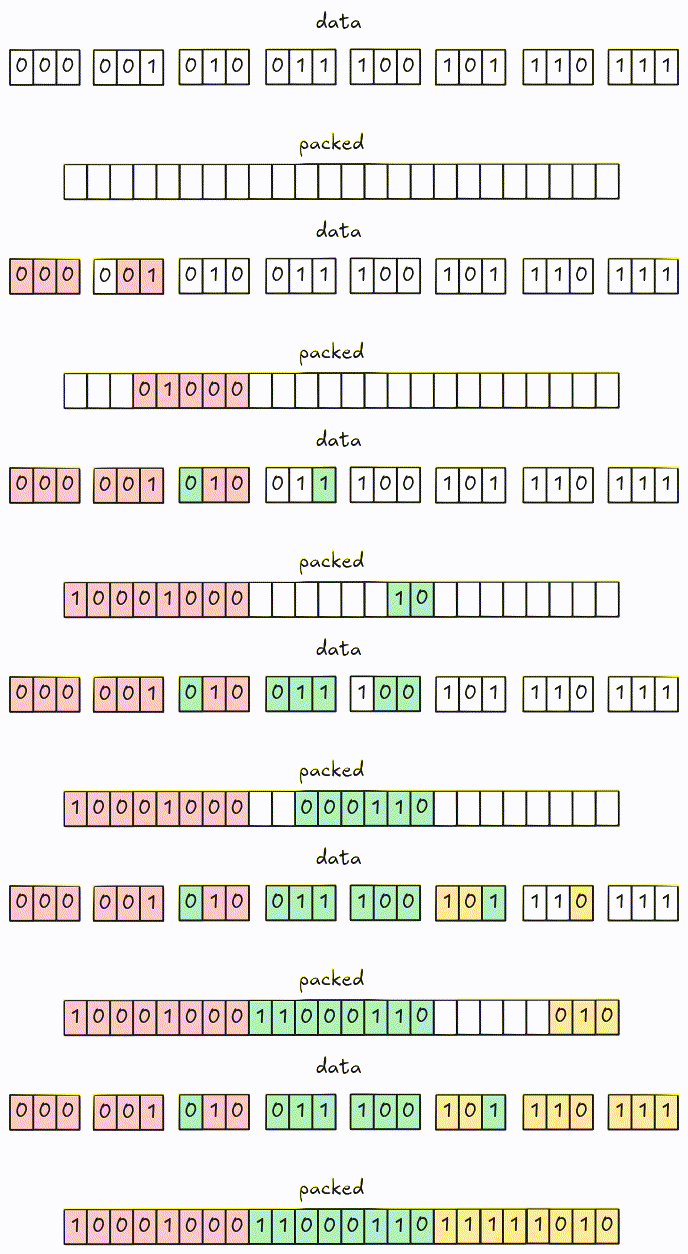
Encoding is pretty similar to 1-bit width: encode the data and pack them into groups of bytes. One issue with larger bit-width is that the encoded bits might cross group boundaries. Let’s visualize it using the example from the spec with 3-bit width.

Encoded data is packed into 8-bit groups using different colors.
Decode
In 1-bit width, we fetch and decode an 8-bit group at a time. To handle the encoded bits crossing group boundaries in larger bit-width, we fetch groups into a buffer and decode it instead of the actual groups.
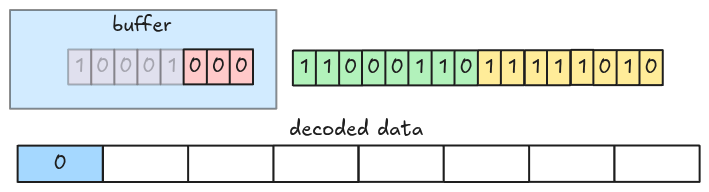
Let’s see an example. This is a packed data with 3-bit width.

At the beginning, the decoder fetches the first 8-bit group into the buffer and decodes the first 3 bits (LSB).
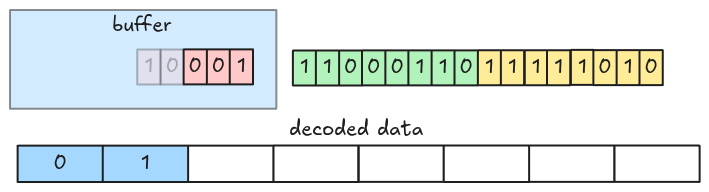
Then the next 3 bits.
Now, the buffer only has 2 bits (the value spans a group boundary), so the decoder fetches the next group from the packed encoded data.
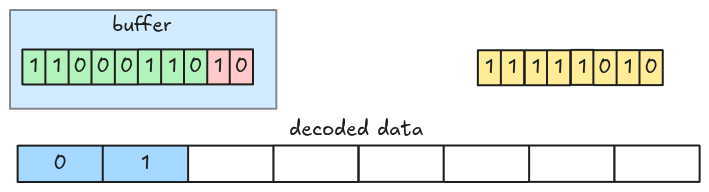
And decodes the next 3 bits.
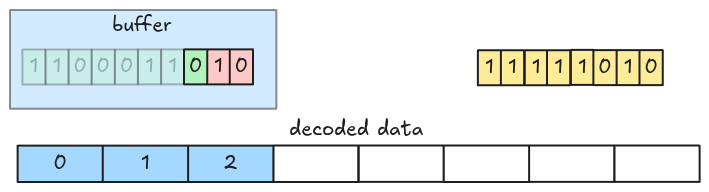
This is the full animation:
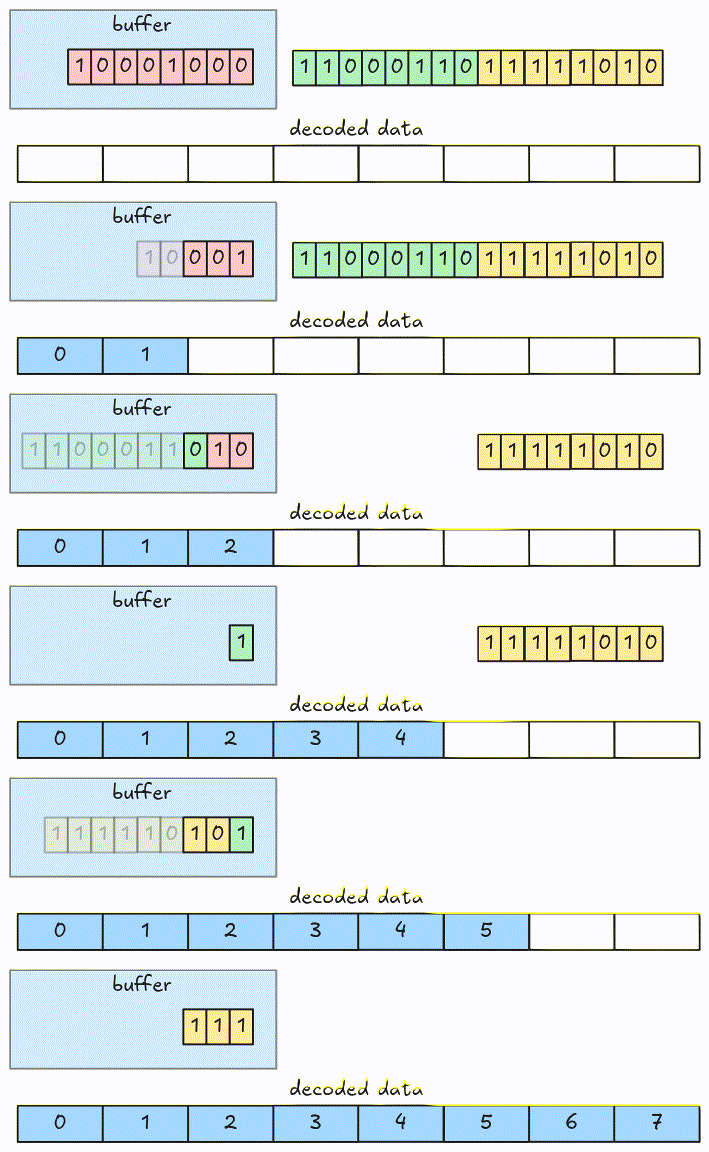
The algorithm can be optimized by fetching more than 8-bit at a time.
Task
Update the bit_packed_decode function in src/decoder/bit_packed.rs to handle arbitrary
bit-width.
pub fn bit_packed_decode(
    encoded_data: Bytes,
    parquet_type: Type,
    bit_width: u8,
    num_values: usize,
) -> Result<Vec<Scalar>> {
    // ...
}
The data type for indexes should be Type::INT32, this must be passed by the caller.
Test
Test case for this step is step12_03_dictionary_decoder_bit_packed.
Hints and Solution
Hint (how to fetch groups)
Groups should be fetched to the left of the buffer, this can be done using bit-shift and bit-or, you also need to keep track of how many bits the buffer contains.
let group = encoded_data.get_u8() as u64;
buffer |= group << buffer_bits;
Hint (how to extract values out of the buffer)
A single value can be extracted using bit-and with the bit-width mask.
let mask = u64::MAX >> (64 - bit_width);
let value = buffer & mask;
Solution
pub fn bit_packed_decode(
    encoded_data: Bytes,
    parquet_type: Type,
    bit_width: u8,
    num_values: usize,
) -> Result<Vec<Scalar>> {
    let mut encoded_data = encoded_data;
    let mut scalars = Vec::with_capacity(num_values);

    let mask = u64::MAX >> (64 - bit_width);
    let mut buffer = 0;
    let mut buffer_bits = 0;

    while scalars.len() < num_values {
        // Buffer needs more bits
        while buffer_bits < bit_width {
            let group = encoded_data.get_u8() as u64;
            // put the group data to the left of the current buffer
            buffer |= group << buffer_bits;
            buffer_bits += 8;
        }

        let scalar = match parquet_type {
            Type::BOOLEAN => Scalar::from(buffer & 1 == 1),
            Type::INT32 => Scalar::from((buffer & mask) as i32),
            _ => unimplemented!("bit_packed_decode: unsupported type: {:?}", parquet_type),
        };
        scalars.push(scalar);

        buffer = buffer.checked_shr(bit_width as u32).unwrap_or(0);
        buffer_bits -= bit_width;
    }

    Ok(scalars)
}
RLE Integers
In this step, we handle RLE run with arbitrary bit-width. This is similar to Bit-packed integers.
Task
Update the rle_decode function in src/decoder/rle.rs to handle arbitrary bit-width.
pub fn rle_decode(
    encoded_data: Bytes,
    parquet_type: Type,
    bit_width: u8,
    num_values: usize,
) -> Result<Vec<Scalar>> {
    // ...
}
Test
Test case for this step is step12_05_dictionary_decoder_rle.
Hints and Solution
Hint
Use the bit_packed_decode function.
Solution
pub fn rle_decode(
    encoded_data: Bytes,
    parquet_type: Type,
    bit_width: u8,
    num_values: usize,
) -> Result<Vec<Scalar>> {
    let scalar = bit_packed_decode(encoded_data, parquet_type, bit_width, 1)?
        .pop()
        .with_context(|| "rle_decode: cannot get decoded scalar from `bit_packed_decode`")?;
    let scalars = vec![scalar; num_values];
    Ok(scalars)
}
Bonus: Interactive Testing
The parser can now read data encoded with Dictionary Encoding. Let’s test it!
Data
The CSV data is in data/all.csv.
col_bool,col_integer,col_real,col_string
true,1,1.1,one
false,2,2.2,two
true,3,3.3,three
true,4,4.4,four
false,5,5.5,five
false,6,6.6,six
true,7,7.7,seven
true,8,8.8,eight
Command
To apply Dictionary Encoding, set the dictionary flag: --dictionary.
# write csv to a parquet file
cargo run write data/all.csv all.parquet --encodings col_bool=rle --dictionary

# read the parquet file
cargo run read all.parquet
Result
    Finished `dev` profile [unoptimized + debuginfo] target(s) in 0.17s
     Running `target/debug/parquet-parser read all.parquet`
shape: (8, 4)
┌──────────┬─────────────┬──────────┬────────────┐
│ col_bool ┆ col_integer ┆ col_real ┆ col_string │
│ ---      ┆ ---         ┆ ---      ┆ ---        │
│ bool     ┆ i64         ┆ f64      ┆ str        │
╞══════════╪═════════════╪══════════╪════════════╡
│ true     ┆ 1           ┆ 1.1      ┆ one        │
│ false    ┆ 2           ┆ 2.2      ┆ two        │
│ true     ┆ 3           ┆ 3.3      ┆ three      │
│ true     ┆ 4           ┆ 4.4      ┆ four       │
│ false    ┆ 5           ┆ 5.5      ┆ five       │
│ false    ┆ 6           ┆ 6.6      ┆ six        │
│ true     ┆ 7           ┆ 7.7      ┆ seven      │
│ true     ┆ 8           ┆ 8.8      ┆ eight      │
└──────────┴─────────────┴──────────┴────────────┘
Metadata
You can see from the metadata, there is a new RLE_DICTIONARY encoding added.
cargo run metadata all.parquet
    Finished `dev` profile [unoptimized + debuginfo] target(s) in 0.18s
     Running `target/debug/parquet-parser metadata all.parquet`
...
column 1:
--------------------------------------------------------------------------------
column type: INT64
column path: "col_integer"
encodings: PLAIN RLE RLE_DICTIONARY
...
Compression
Pages in a parquet file might be compressed, the compression codec is stored in the codec field in
column metadata.
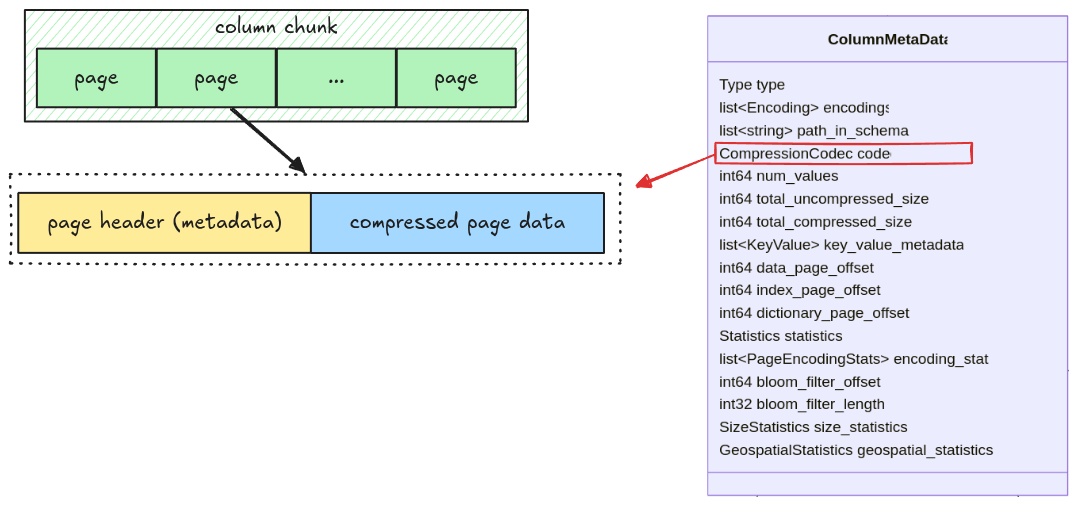
There are many codecs listed in the spec, however, our parser will only support SNAPPY.
Task
decompress
Implement the decompress function in src/compression.rs.
pub fn decompress(compressed_data: Bytes, codec: CompressionCodec) -> Result<Bytes> {
    match codec {
        CompressionCodec::UNCOMPRESSED => todo!("step13: implement compression"),
        CompressionCodec::SNAPPY => todo!("step13: implement compression"),
        _ => unimplemented!("Unsupported codec: {}", codec.0),
    }
}
read_page
Update the read_page function to decompress a compressed page data.
pub fn read_page(data: Bytes, codec: CompressionCodec) -> Result<(Page, Bytes)> {
    // ...
}
For snappy decompression, refer to snap crate.
Test
Test case for this step is step13_compression.
Hints and Solution
Hint (how to handle uncompressed data)
For uncompressed data, you return it directly in the decompress function.
Hint (how to handle snappy compression)
For snappy compression, you can decompress it with decompress_vec.
Solution
decompress:
pub fn decompress(compressed_data: Bytes, codec: CompressionCodec) -> Result<Bytes> {
    match codec {
        CompressionCodec::UNCOMPRESSED => Ok(compressed_data),
        CompressionCodec::SNAPPY => {
            let mut decompressor = snap::raw::Decoder::new();
            let buf = decompressor.decompress_vec(compressed_data.as_ref())?;
            Ok(Bytes::from(buf))
        }
        _ => unimplemented!("Unsupported codec: {}", codec.0),
    }
}read_page:
pub fn read_page(data: Bytes, codec: CompressionCodec) -> Result<(Page, Bytes)> {
    let (page_header, mut remaining) = read_thrift_metadata::<PageHeader>(data)?;
    let page_data = remaining.split_to(page_header.compressed_page_size as usize);
    let mut page_data = decompress(page_data, codec)?;
    let page = match page_header.type_ {
        // ...
    };
    Ok((page, remaining))
}
Bonus: Interactive Testing
This time, we can read a real parquet file (Not those created from our CLI).
Data
The data is the titanic dataset:
curl -L -o titanic.parquet "https://huggingface.co/datasets/BIT/titanic-dataset/resolve/refs%2Fconvert%2Fparquet/default/train/0000.parquet"
Command
cargo run read titanic.parquet
Result
    Finished `dev` profile [unoptimized + debuginfo] target(s) in 0.18s
     Running `target/debug/parquet-parser read titanic.parquet`
shape: (891, 15)
┌──────────┬────────┬────────┬──────┬───┬──────┬─────────────┬───────┬───────┐
│ survived ┆ pclass ┆ sex    ┆ age  ┆ … ┆ deck ┆ embark_town ┆ alive ┆ alone │
│ ---      ┆ ---    ┆ ---    ┆ ---  ┆   ┆ ---  ┆ ---         ┆ ---   ┆ ---   │
│ i64      ┆ i64    ┆ str    ┆ f64  ┆   ┆ str  ┆ str         ┆ str   ┆ bool  │
╞══════════╪════════╪════════╪══════╪═══╪══════╪═════════════╪═══════╪═══════╡
│ 0        ┆ 3      ┆ male   ┆ 22.0 ┆ … ┆ null ┆ Southampton ┆ no    ┆ false │
│ 1        ┆ 1      ┆ female ┆ 38.0 ┆ … ┆ C    ┆ Cherbourg   ┆ yes   ┆ false │
│ 1        ┆ 3      ┆ female ┆ 26.0 ┆ … ┆ null ┆ Southampton ┆ yes   ┆ true  │
│ 1        ┆ 1      ┆ female ┆ 35.0 ┆ … ┆ C    ┆ Southampton ┆ yes   ┆ false │
│ 0        ┆ 3      ┆ male   ┆ 35.0 ┆ … ┆ null ┆ Southampton ┆ no    ┆ true  │
│ …        ┆ …      ┆ …      ┆ …    ┆ … ┆ …    ┆ …           ┆ …     ┆ …     │
│ 0        ┆ 2      ┆ male   ┆ 27.0 ┆ … ┆ null ┆ Southampton ┆ no    ┆ true  │
│ 1        ┆ 1      ┆ female ┆ 19.0 ┆ … ┆ B    ┆ Southampton ┆ yes   ┆ true  │
│ 0        ┆ 3      ┆ female ┆ null ┆ … ┆ null ┆ Southampton ┆ no    ┆ false │
│ 1        ┆ 1      ┆ male   ┆ 26.0 ┆ … ┆ C    ┆ Cherbourg   ┆ yes   ┆ true  │
│ 0        ┆ 3      ┆ male   ┆ 32.0 ┆ … ┆ null ┆ Queenstown  ┆ no    ┆ true  │
└──────────┴────────┴────────┴──────┴───┴──────┴─────────────┴───────┴───────┘
Metadata
If you inspect the metadata, you can see that the compression is snappy!
cargo run metadata titanic.parquet
    Finished `dev` profile [unoptimized + debuginfo] target(s) in 0.17s
     Running `target/debug/parquet-parser metadata titanic.parquet`
...
column 0:
--------------------------------------------------------------------------------
column type: INT64
column path: "survived"
encodings: PLAIN RLE RLE_DICTIONARY
file path: N/A
file offset: 228
num of values: 891
compression: SNAPPY
total compressed size (in bytes): 224
total uncompressed size (in bytes): 219
...